Short answer
To build a B2B sales pipeline that predicts revenue, define stages by what the buyer has done, require specific facts to leave each stage, give each stage a win probability and a time limit, and review stalled deals weekly. Record a reason for every lost deal and measure conversion from one stage to the next.
- Steps: six
- Review: weekly
- You need: stages with exit criteria
On this page
Why a B2B sales pipeline stops predicting revenue#
A B2B sales pipeline stops predicting revenue when its stages describe the seller’s mood and say nothing about the buyer. A deal sits in “Negotiation” because the rep feels good about it. Nothing says who decides, what the budget is or when the decision is due, so the forecast adds up deals that will never close.
Three habits keep a pipeline honest. Every stage has a written exit criterion, so the same deal looks the same to every rep. Every stage has a time limit, so a stalled deal shows up while it can still be saved. Every lost deal carries a reason, so the lost half of the pipeline teaches something. The six steps below build those habits in order, and the sections after them cover each question that comes up on the way.
- Sales pipeline
- A sales pipeline is the ordered set of stages that a deal passes from first inquiry to a signed contract, together with the deals that currently stand in each stage.
- Stage exit criteria
- Stage exit criteria are the facts that must be recorded on a deal before it may move to the next stage.
- Weighted pipeline
- A weighted pipeline is the sum of open deal amounts, each multiplied by the win probability of its stage.
- Stalled deal
- A stalled deal is an open deal that has spent more days in its current stage than the time limit set for that stage.
- Stage conversion
- Stage conversion is the share of deals that entered a stage and moved on to the next one.
The 6-step method to build a pipeline that forecasts#
Krokul CRM is a B2B CRM for contract-based companies: deals, projects and profit per client in one system, implemented by integration partners. The method works in any tool, and each step names the Krokul screen where one exists, starting with the pipeline settings in Krokul.
Name the stages after what the buyer has done
Write five to seven stages, each one a fact about the buyer: inquiry received, need qualified, proposal sent, price negotiated, contract out for signature. Add two closing outcomes, won and lost. A stage named “Interested” cannot be checked, while “Proposal sent” can.
In Krokul, each pipeline is a list of stages in board order, and a company can run several pipelines, for example new business and renewals.
Write exit criteria for every stage
List the facts needed to leave each stage: the decision maker for “Qualified”, the quote and a next-step date for “Proposal sent”, the agreed price for “Negotiation”. Keep the list to two or three fields, so filling it never feels like paperwork.
Krokul stores these as required fields of the stage. A deal that lacks them stays where it is, and the card names the missing fields. The server checks the rule, so dragging a card on the board and an API call get the same answer.
Set a win probability and a time limit per stage
Give each stage a probability that reflects your own history, for example 10 % for a new inquiry and 85 % for a contract out for signature. Then set the number of days a deal may stay in the stage, based on how long your wins usually take there.
The stage settings in Krokul hold both values next to the number of deals now in the stage and a badge with the count of required fields.
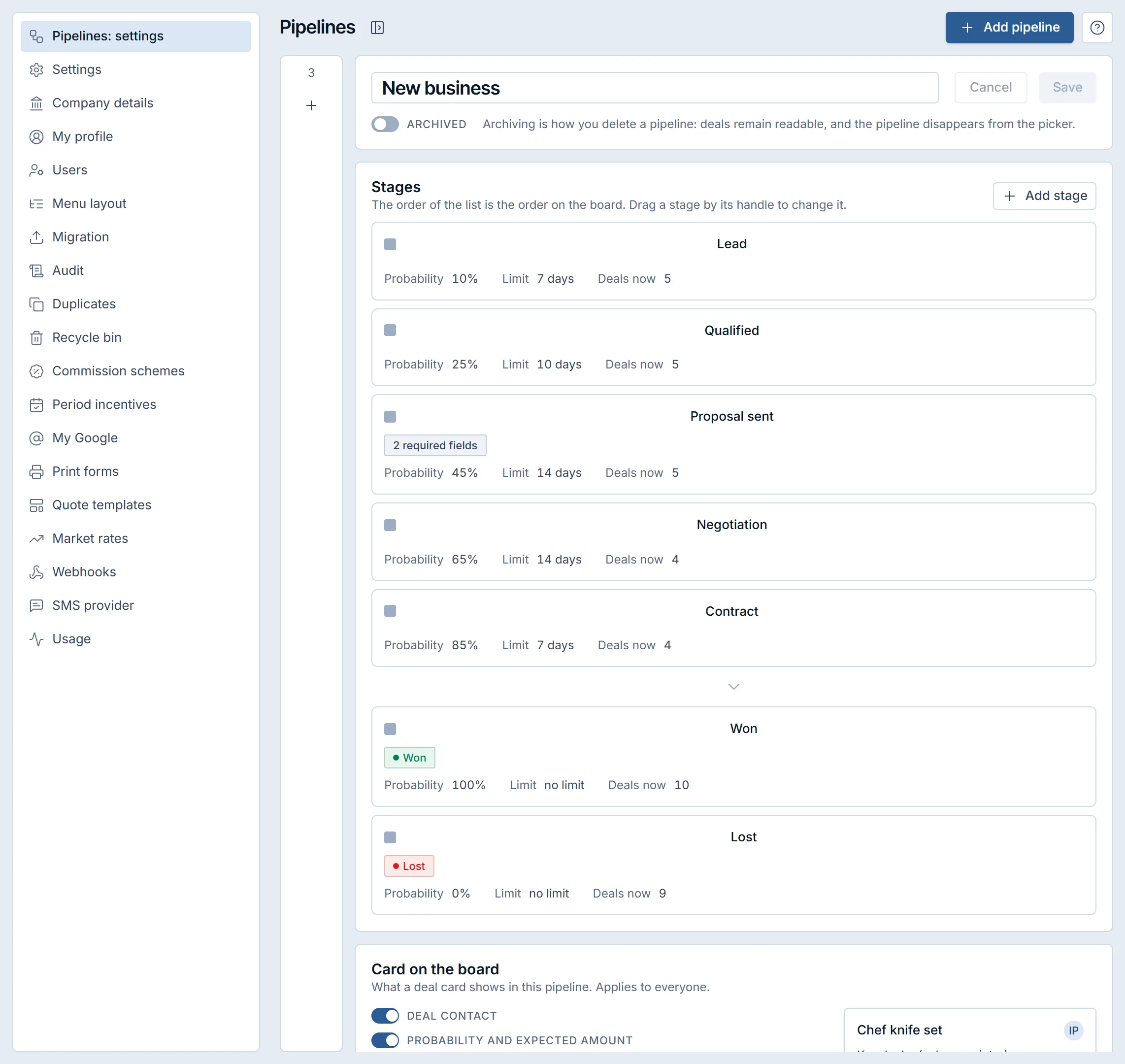
Stage settings in a Krokul demo workspace: probability, day limit and required fields for each stage. Qualify with the same questions on every deal
Ask every prospect the same short list: budget, decision maker, timeline, current solution. Give each answer a score, so a deal with a confirmed budget ranks above one that refuses to discuss it.
Krokul keeps these as qualification questions of the pipeline and calculates the score on the server. A prospect can answer them on a shared page, so the rep does not retype anything.
Review stalled deals once a week
Every week, list the deals that stand longer than the limit of their stage, oldest first. Ask the same question about each one: what is the next step, who owns it and by which date? Close the deal as lost when nobody can answer.
Record a lost reason and measure conversion monthly
Require a reason from a fixed list on every lost deal. Once a month, look at how many deals moved from each stage to the next and which reasons come first on the list. The weakest stage gets next month’s attention.
Krokul refuses to close a deal as lost without a reason, and its funnel report shows conversion by stage next to the lost reasons.
How to write exit criteria for each pipeline stage#
Stage exit criteria are the facts a deal must carry before it moves on, and two or three per stage are enough. The template and the reasoning are in the guide on pipeline stage exit criteria, and the table shows the shape.
| Moving to | Facts that must be recorded | Why it matters |
|---|---|---|
| Qualified | Contact person, source, rough budget range | Separates real inquiries from curiosity |
| Proposal sent | Decision maker named, need described in one sentence, expected close date | Makes the forecast date a statement from the buyer |
| Negotiation | Quote sent, next-step date | Every open deal has a dated next action |
| Contract | Agreed price, legal contact | Contract drafting starts with complete data |
| Won | Signed contract, start date | Delivery and invoicing can begin without questions |
Krokul lets the pipeline administrator choose the required fields for each stage, including custom fields, and the card cannot hide a field that the stage requires. A manager can open a block of the funnel report that lists attempts to skip required fields, with the person, the deal and the missing fields, which shows which criterion your team finds hardest to fill in.
How to find stalled deals and follow up on time#
A stalled deal is an open deal that has stayed in its stage longer than the limit set for that stage, so the limit has to differ by stage. The routine and the filters are in the guide on finding stalled deals.
| Deal | Stage | Days in stage | Stage limit | Status |
|---|---|---|---|---|
| Deal A | Qualified | 12 | 10 days | Stalled, 2 days over |
| Deal B | Proposal sent | 6 | 14 days | On track |
| Deal C | Negotiation | 21 | 14 days | Stalled, 7 days over |
| Deal D | New inquiry | 3 | 7 days | On track |
Krokul calculates this on the server from the date of the deal’s last movement and offers the result as a ready filter named “Stalled” in the deal list. A stage with no limit never counts as stalled, because the rule needs a number to compare against. An automation rule on the trigger “deal inactive for N days” creates a task for the deal owner, which turns the weekly review into a daily nudge. Automations are part of the Money plan.
Each stalled deal gets one of three outcomes in the weekly review. It moves forward with a dated next step, it returns to an earlier stage when the buyer has not yet met the criteria, or it closes as lost with a reason. Leaving it unchanged is the fourth outcome, and the one to avoid.
How to measure where deals drop off#
Stage conversion shows the share of deals that entered a stage and moved on, and the stage with the lowest share is where deals drop off. The guide on conversion by stage and cohort analysis explains how to read a cohort and why a young cohort misleads.
| Stage | Deals entered | Moved on | Conversion |
|---|---|---|---|
| New inquiry | 100 | 60 | 60 % |
| Qualified | 60 | 36 | 60 % |
| Proposal sent | 36 | 18 | 50 % |
| Negotiation | 18 | 12 | 67 % |
| Contract | 12 | 9 | 75 % |
Conversion at each stage is the deals that moved on divided by the deals that entered, so 18 ÷ 36 gives 50 % for “Proposal sent”. Overall, 9 of 100 deals were won. The proposal stage loses half of its deals, so that is where the next month’s effort goes.
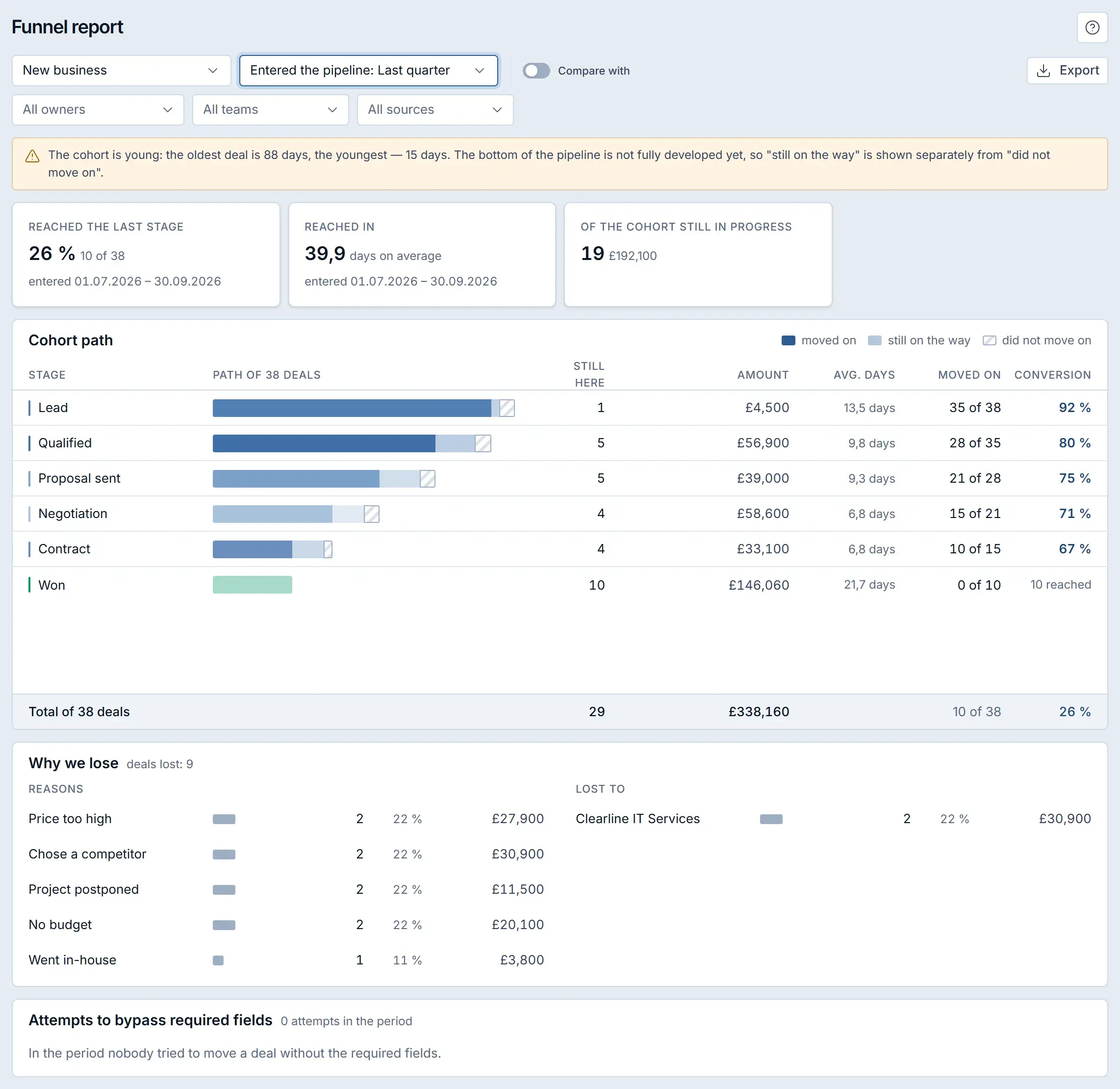
The funnel report in Krokul takes the cohort of deals that entered the pipeline in a chosen period and splits each stage into three outcomes: moved on, still on the way and did not move on. The “still on the way” group keeps a young cohort from being blamed for time that has not yet passed. The report compares with the previous period or the same period a year earlier and exports to Excel. The Deals plan keeps three months of report history, and paid plans keep more.
How to build a list of lost deal reasons that explains why you lose#
A lost deal reasons list is a short, fixed set of choices that every lost deal must carry, and five to eight options are enough. The guide on lost deal reasons shows how to choose them so that the numbers mean something.
- Use a closed list. Free text produces forty spellings of “too expensive”.
- Make each option a decision of the buyer: price too high, chose a competitor, project postponed, no budget, went in-house.
- Record the competitor separately when the reason is “chose a competitor”.
- Review the list every quarter and merge options that nobody uses.
In Krokul the reason is required. A deal cannot move to a lost stage without one, and the funnel report adds up the reasons by count and amount, with a second view of who the deals were lost to.
Read the reasons together with the amounts. Two deals lost to “no budget” worth £40,000 in total matter more than five deals lost to “project postponed” worth £10,000, and each answer points somewhere different: a budget problem points at qualification, and a postponed project points at the timing of your follow-up.
Weighted pipeline or commit forecast: which one to use#
A weighted pipeline multiplies each open deal by the probability of its stage, and a commit forecast counts only the deals the rep personally promises to close. A small B2B team can run both side by side. The comparison and the cases for each are in the guide on weighted pipeline versus commit forecast.
| Stage | Open deals | Amount | Probability | Weighted amount |
|---|---|---|---|---|
| Qualified | 10 | £120,000 | 25 % | £30,000 |
| Proposal sent | 6 | £90,000 | 45 % | £40,500 |
| Negotiation | 4 | £80,000 | 65 % | £52,000 |
| Contract | 2 | £50,000 | 85 % | £42,500 |
| Total | 22 | £340,000 | £165,000 |
Each weighted amount is the stage amount times its probability, so £90,000 × 45 % gives £40,500. The pipeline holds £340,000, and the forecast says to plan around £165,000. Probabilities that come from your own win rates by stage keep the weighted number honest.
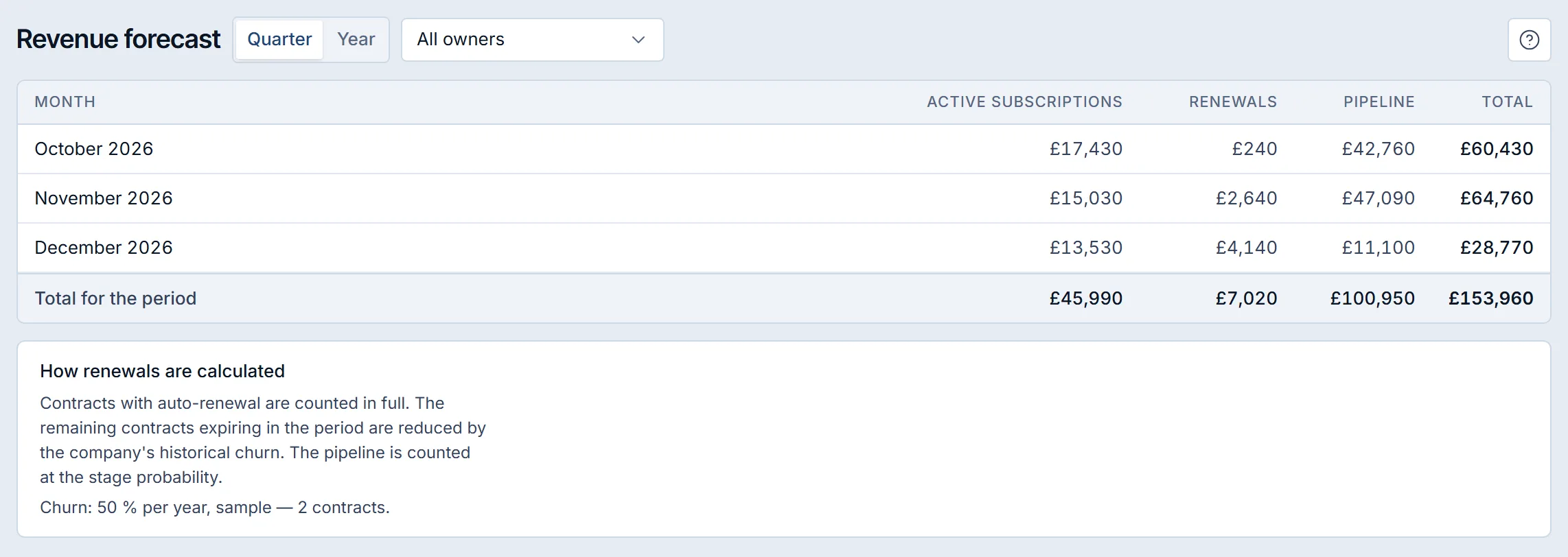
Krokul’s Revenue forecast screen builds the quarter or the year from open deals with an expected close date, multiplied by the probability of their stage, and adds active subscriptions and renewals in the same table. Each deal also carries a forecast category (commit, best case, pipeline or omitted) that the rep sets, and the screen shows those totals unweighted, apart from the weighted ones.
How to qualify B2B inquiries with a shared questionnaire#
A shared qualification questionnaire is a short list of questions that the prospect answers on a web page, so the answers reach the deal without retyping. The questions and the scoring are described in the guide on qualifying B2B inquiries with a questionnaire.
- Ask five to eight questions: budget, decision maker, timeline, current solution, volume.
- Give a score to each answer where a score makes sense, so the sum ranks the deals.
- Mark the two or three questions that must be answered before the deal leaves the qualification stage.
- Send the link right after the first call, while the conversation is fresh.
Krokul pipelines carry their own questions of four types: a choice, yes or no, a number and free text. A choice carries points per option and a yes carries points too, while numbers and text record evidence without a score. The server calculates the total. A required question blocks the move to the next stage until it has an answer, and an answer worth zero points still counts as an answer. The shared link is valid for seven days by default, from one to ninety days, and issuing a new link cancels the previous one.
How to turn website forms and Telegram messages into deals#
Capturing website inquiries into a CRM means that every form submission or chat message creates a contact and a deal with the source recorded, without anyone copying text by hand. The setup is in the guide on turning website forms and Telegram messages into deals.
Krokul accepts inquiries from a web form (a one-line widget or your own form), from Google Forms and from a Telegram bot. For each one the gateway looks for an existing contact by phone, email or messenger account before it creates a new one, and a company name from the form is attached to an existing client or creates one, so the same buyer does not appear twice. Setting up an intake flow belongs to the Money plan.
How to summarize sales calls and meetings with AI#
An AI call summary turns a recording into a short note and a proposed next step, and the rep confirms the step before anything changes. The comparison of approaches is in the guide on summarizing sales calls with AI.
In Krokul, the assistant Kro transcribes a call recording, writes a summary into the deal feed and proposes a next step: a task, a stage change or an email. Nothing runs until the manager confirms it with one click, and the confirmed action runs with that manager’s permissions. Call analysis is limited by monthly minutes on paid plans, and automatic analysis starts only after the company switches it on.
How to set up sales commission schemes reps can check themselves#
A commission scheme states what the rep is paid for, from which moment and at what rate, and a rep who can see the accrual during the month has nothing to dispute at its end. The scheme design is in the guide on sales commission schemes.
| Decision | Options | What to check |
|---|---|---|
| Base | Received payment, deal amount or margin | A margin base discourages discounting to zero |
| Recognition | On payment or on win | Match it to how fast clients pay |
| Rate | One rate or tiers by period volume | Write the tier thresholds into the scheme |
| Reversal | A refund reduces the accrual in the current period | Decide this before the first refund arrives |
Krokul calculates accruals from the same payments and deals it already holds, reverses them on a refund and closes the period in one step. Each rep sees their own accruals in their profile.
Which pipeline mistakes make a forecast miss#
- Naming stages after feelings. “Warm” and “Hot” cannot be audited; name them after buyer actions such as “Proposal sent”.
- Copying probabilities from a blog. A probability taken from someone else’s funnel misleads; set it from your own win rates by stage and revisit it each quarter.
- Allowing stage moves without data. A deal that jumps forward with empty fields makes the forecast an opinion; require two or three facts per stage.
- Letting stalled deals sit. A deal nobody touches keeps taking space in the forecast; review it weekly and close it as lost when no one can name a next step.
- Closing lost deals with “other”. A reason list that hides the cause teaches nothing; keep options specific and the list short.
- Measuring conversion on a young cohort. Deals that entered last week cannot have closed yet; read “still on the way” separately.
Where to start: a decision table#
Pick the row that matches the symptom you see in your pipeline today and read that guide first. Each fix fits into one week.
| Symptom | First fix | Guide |
|---|---|---|
| Deals jump between stages with empty cards | Write two or three exit criteria per stage | Stage exit criteria |
| Deals sit for weeks and nobody notices | Set a time limit per stage and review weekly | Stalled deals |
| You do not know which stage loses the most deals | Measure conversion by cohort | Conversion by stage |
| The forecast is the sum of every open deal | Weight deals by stage probability | Weighted pipeline |
| Lost deals say “other” | Replace free text with a closed list | Lost deal reasons |
| First calls end without a record | Use one questionnaire for every prospect | Qualification questionnaire |
| Website inquiries are copied by hand | Connect the form to the pipeline | Website inquiries to deals |
| Notes from calls never reach the CRM | Summarize recordings and confirm the next step | Call summaries |
| Bonus calculation takes a spreadsheet | Define base, recognition and rate once | Commission schemes |
Frequently asked questions#
How many stages should a B2B sales pipeline have?
Five to seven open stages plus won and lost cover most B2B sales cycles. More stages slow reps down with moves nobody checks, and fewer hide the point where deals drop off.
How do I set the probability for each stage?
Take the share of deals that reached the stage and were later won, from your last two or three quarters. With no history, start with round estimates such as 10, 25, 45, 65 and 85 percent and replace them with your own rates as data accumulates.
How many days should a deal stay in one stage?
Use the typical time your won deals spent in that stage and add a margin of about half. A stage where wins usually take ten days gets a limit near fifteen, and deals beyond it deserve a question.
Should every B2B sale go through one pipeline?
Run a separate pipeline for each sales process with different stages, such as new business, renewals and tenders. Mixing them makes stage probabilities and conversion numbers meaningless.
How often should I review the pipeline?
Review stalled deals every week and conversion by stage every month. A quarterly check of probabilities against actual win rates keeps the forecast calibrated.
Do I need a CRM to run this method?
The method works in a spreadsheet for a handful of deals. A CRM becomes useful when stage rules, time limits and conversion reports have to work on dozens of open deals without manual counting.