Short answer
To build a first touch source report and find which inquiry source brings clients that sign, open the First touch report to see how many new contacts each source and each UTM source produced, then open the funnel report and filter it by one source at a time. Compare the won deals and the won amount per source.
- Screens: First touch, funnel report
- Counts: new contacts, won deals
- Role: head of sales
On this page
When a source report is worth building#
- The budget goes to three channels and nobody can say which one brings clients, only which one brings messages.
- Every inquiry is tagged as the website, so the source field says nothing.
- An AI assistant or a partner sends people, but no report shows how many of them became clients.
- Marketing counts inquiries and sales counts signed deals, and the two numbers never meet.
The source report sits at the top of the B2B sales pipeline that predicts revenue, before the stages. It answers where a person came from, and the funnel answers what happened to them.
How to build a first touch source report in six steps#
Give every source a kind
Open the settings and the Sources tab. Each source has a kind, which groups the channels: inbound inquiries, outbound, referrals, partners, paid advertising, organic, AI assistants and other. Set the kind of every source, for example the kind AI assistants for a source named after a chatbot. A source without a kind is shown in the report as a separate row, so the groups stay honest.
Administrators and managers set the kinds. Keep the list short: a source list of forty names answers nothing.
Make every inquiry arrive with its source
The source is set in the contact card and in the Sources directory. A website form passes its UTM marks together with the inquiry, and the marks of the first inquiry with marks stay on the contact. A later inquiry of the same person does not overwrite them. That is the first touch: the moment a person first reached the CRM, from a form, a call or an import.
The guide on turning website forms and Telegram messages into deals shows how inquiries arrive with their source.
Read the First touch report for a period
Open the First touch report in the analytics and choose both ends of the period. Without a choice, the report counts all time. The report gives the number of new contacts for the period, the share of each kind of source, the same count per source with its kind, and the count per UTM source of the first inquiry with marks.
Shares are taken from all new contacts, and the rows without a source and without marks are included in them, so you see how many contacts are still not sorted.
Close the gaps before you compare
Look at the rows without a source and without marks. When they hold a third of the contacts, a comparison of sources describes only the other two thirds. Fill in the source on the contact card, or make the form and the integrations set it, and only then compare.
Tip. The report counts people by their first touch, while the source of a deal belongs to one inquiry. One person can have several deals, each with its own source.
Filter the funnel report by one source at a time
Open the funnel report, choose the pipeline and the period of entry, and narrow it with the filter for sources. Choose one source, then the next. The cohort path shows how many deals of that source reached each stage and how many were won, with the amounts. The filters move into the deal register when you open a stage from the report, so you can read the deals behind a number.
This is where inquiries turn into clients that sign. The received payments are not split by source in the reports, so the evidence here is won deals and the won amount, and a source that looks good should be checked against the payments of those clients.
For a view of your own, administrators and managers can add a dashboard widget: won deals split by source, shown as a table.
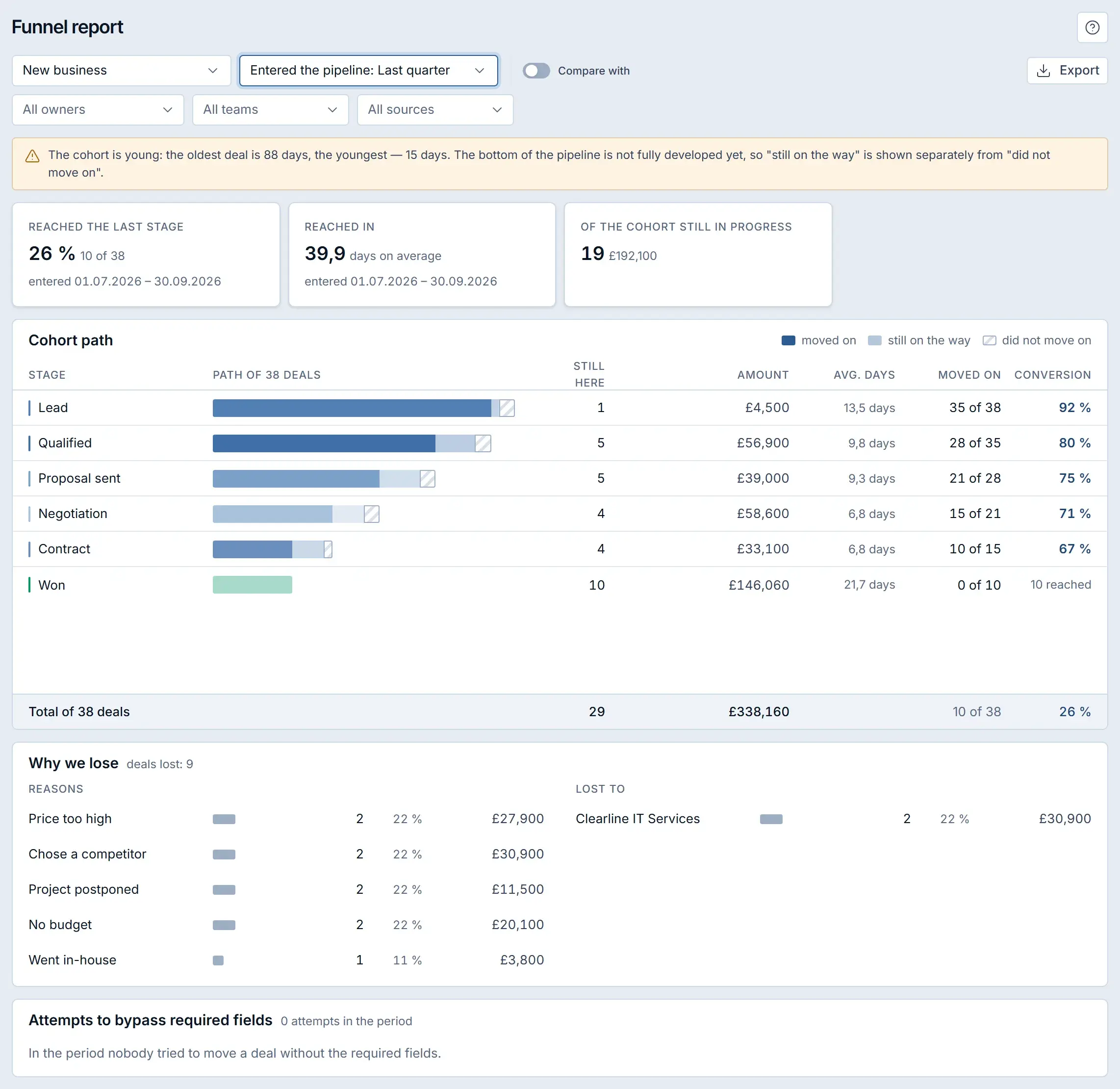
A different screen: the funnel report of a Krokul demo workspace. The All sources filter narrows the cohort to the deals of the sources you choose. Compare the sources and decide where to put the budget
Put the counts of the two reports next to each other: new contacts per source, deals of that source in the funnel, won deals and the won amount. The source with the most contacts is not always the source with the most signed clients. Move budget and effort towards the source with the best share of won deals, and keep a small test on the rest.
Repeat the review each quarter. A source needs enough deals to be judged, so do not decide on a month with a handful.
What the comparison looks like for four sources#
The table puts the two reports side by side for a SaaS vendor in one quarter. The numbers are an example.
| Source | New contacts | Deals created | Won deals | Won share | Won amount |
|---|---|---|---|---|---|
| Website form | 120 | 40 | 6 | 15% | £48,000 |
| Paid advertising | 90 | 30 | 2 | 7% | £12,000 |
| Partners | 25 | 15 | 6 | 40% | £66,000 |
| AI assistants | 30 | 10 | 2 | 20% | £14,000 |
Won share = won deals ÷ deals created from the source. The partners bring the fewest contacts and the best share, 6 of 15 deals, which is 40%. Paid advertising brings 90 contacts and wins 2 of 30 deals, which is 7%. The result suggests moving effort from paid advertising to partners, with a check of the payments of those won deals.
Which mistakes distort a source report#
- Comparing sources by the number of contacts. The contacts do not pay, so look at the won deals of each source too.
- Leaving most contacts without a source. The comparison covers a fraction of the base, so close the gaps first.
- Mixing the source of a person with the source of a deal. The first touch report counts people, and the funnel filter counts deals, so read the two as two questions.
- Judging a source on a short period. A quarter with a few deals is noise, so wait for the sample.
- Trusting the source field typed by hand. Reps write what they remember, so let the form and the integrations set the source.
Source report checklist#
- Every source has a kind.
- Forms and integrations set the source and the UTM marks.
- The rows without a source and without marks hold a small share.
- The First touch report is read for the whole quarter.
- The funnel report is filtered by one source at a time.
- The won deals of the leading source are checked against payments.
How the source report fits the rest of the funnel#
The source report answers the first question of the funnel, and the stage conversion and cohort analysis answer the next ones. To see how the reports work on the same deals and contacts, read about inquiry sources and first touch in the Krokul reports.
Frequently asked questions#
What is the first touch in Krokul?
It is the moment a person first reached the CRM, from a website form, a call or an import. The UTM marks of the first inquiry with marks stay on the contact, and a later inquiry does not overwrite them.
Why are most contacts shown without a source?
Their source is not set. Fill in the source in the contact card, or make the website form and the integrations set it, and the rows without a source shrink.
Does the report show how much a source earned?
The First touch report counts new contacts. The funnel report shows won deals and the won amount per source, but the received payments are not split by source in the reports.