Short answer
A stalled deal in a B2B pipeline is an open deal with no movement for longer than the limit set for its stage. To find stalled deals, set a limit in days for every stage, list open deals over that limit every week, and give each one a dated next step or close it with a reason.
- Review: weekly
- You need: a day limit for every stage
- Outcome: a dated next step or a lost reason
On this page
When do you need to look for stalled deals?#
You need to look for stalled deals whenever the pipeline holds more open deals than anyone can remember. They are the deals that decide whether a forecast holds, and the guide on building a B2B sales pipeline that predicts revenue places the stalled-deal review in the weekly routine of the whole pipeline.
- A forecast meeting reviews the pipeline and half of the deals have no recent update.
- A rep says “the client is thinking” about a deal that was last touched a month ago.
- New deals arrive every week and older ones sink to the bottom of the board.
- A salesperson goes on holiday or leaves, and nobody knows which of their deals are alive.
- The owner wants one number each Monday: how many open deals wait for a decision and how much money sits in them.
- Stalled deal
- A stalled deal is an open deal that has had no movement for more days than the limit set for its current stage.
- Stage limit
- A stage limit is the number of days a deal may stay at one stage without movement, and it is different for each stage.
- Movement
- Movement is a change of stage or a recorded activity on the deal, such as a call, a message or a note.
- Silent deal
- A silent deal is an open deal with no recorded activity for a chosen number of days, whatever its stage.
How to find stalled deals in six steps#
Finding stalled deals takes three inputs, a limit per stage, a definition of movement and a fixed review day. Set the first two once and repeat steps three and four every week.
Set a day limit for every open stage
Give each stage a limit in days, based on how long a healthy deal normally stays there. A new inquiry may have seven days, a stage with a proposal out may have fourteen.
Leave the closing stages without a limit, because a won or lost deal cannot stall.
Decide what counts as movement
Choose one definition and apply it to every deal. A change of stage and a logged call, message or note are movement, and an unrecorded hallway conversation is not.
The clearer the definition is, the fewer arguments a weekly review produces about whether a deal “really” moved.
List the deals over their limit every week
Pick one weekday and list all open deals whose days without movement exceed the limit of their stage. Sort them with the longest delay first and show the amount next to each deal.
A review of ten minutes on the same morning builds the habit that a daily scan never does.
Tip. Run the review before the forecast meeting, so the forecast starts from deals that are alive.
Ask three questions about every stalled deal
What is the next step, who owns it and by which date? A deal that gets a dated next step leaves the list, and a deal where nobody can answer goes to a decision.
Decide on the spot between three outcomes. Set the next step, pause the deal until a date the buyer named, or close it as lost with a reason.
Add an automatic task for silent deals
A weekly list helps only when someone opens it. Add a rule that creates a task for the deal owner after a set number of quiet days, for example seven.
The task reaches the person in the place where they already work, so a forgotten deal comes back before the next review.
Track the count and the amount over time
Write down two numbers after each review, the number of stalled deals and their total amount. A rising amount shows that follow-up slips.
Compare the limits with the average days a deal actually spends on each stage, and move a limit when the data says it is too tight or too loose.
How to measure stalled deals on an example pipeline?#
Measuring stalled deals means comparing the days without movement of every open deal with the limit of its stage. The example uses five open deals and the limits seven, ten, fourteen and fourteen days.
| Deal | Stage | Days without movement | Stage limit | Days over the limit | Amount |
|---|---|---|---|---|---|
| Deal A | Qualified | 12 | 10 days | 2 | £8,000 |
| Deal B | Proposal sent | 6 | 14 days | on track | £15,000 |
| Deal C | Negotiation | 21 | 14 days | 7 | £24,000 |
| Deal D | Contract | 8 | 7 days | 1 | £30,000 |
| Deal E | New inquiry | 3 | 7 days | on track | £4,000 |
Days over the limit = days without movement − stage limit. Stalled amount = sum of the amounts of deals over their limit. In the example, deals A, C and D are stalled, 3 of 5 deals, and £8,000 + £24,000 + £30,000 = £62,000 of the £81,000 in the pipeline, which is 76.5%.
Deal D is only one day over, yet it holds the largest amount, so it goes first in the conversation. Sort the weekly list by delay for the routine, and look at the amount before deciding where to spend the first call.
Which mistakes hide stalled deals?#
- Using one limit for every stage. Early stages then look late and late stages look fine, so set a limit for each stage from its normal duration.
- Counting only from the moment a deal entered the stage. A deal with weekly calls then shows as stalled while a deal with nothing but a stage change looks healthy, so count from the last movement of any kind.
- Reviewing only the board. Deals buried under newer cards are never seen, so review a list sorted by delay.
- Leaving stalled deals open for ever. The forecast keeps their amounts, so close a deal as lost with a reason after the agreed follow-ups fail.
- Sending every alert to the whole team. Nobody owns the task, so assign it to the deal owner with a due date.
A checklist for the weekly stalled-deal review#
Copy the list into the agenda of your weekly pipeline meeting and run it in the same order every time.
- Confirm that every open stage has a day limit and that the closing stages have none.
- List open deals whose days without movement exceed their stage limit, longest delay first.
- Add the amount and the owner to every row.
- Record the next step with a date for each deal, or pause it until a date the buyer named.
- Close deals whose buyer stopped answering after the agreed follow-ups, and choose a lost reason.
- Check the silent deals that have no limit, such as stages without a limit and deals with no activity for 30 days.
- Write down the number of stalled deals and their total amount for the week.
How Krokul shows stalled deals and creates follow-up tasks#
Krokul CRM is a B2B CRM for contract-based companies: deals, projects and profit per client in one system, implemented by integration partners. The pipeline settings, the deals list and the automations apply the six steps to your own deals.
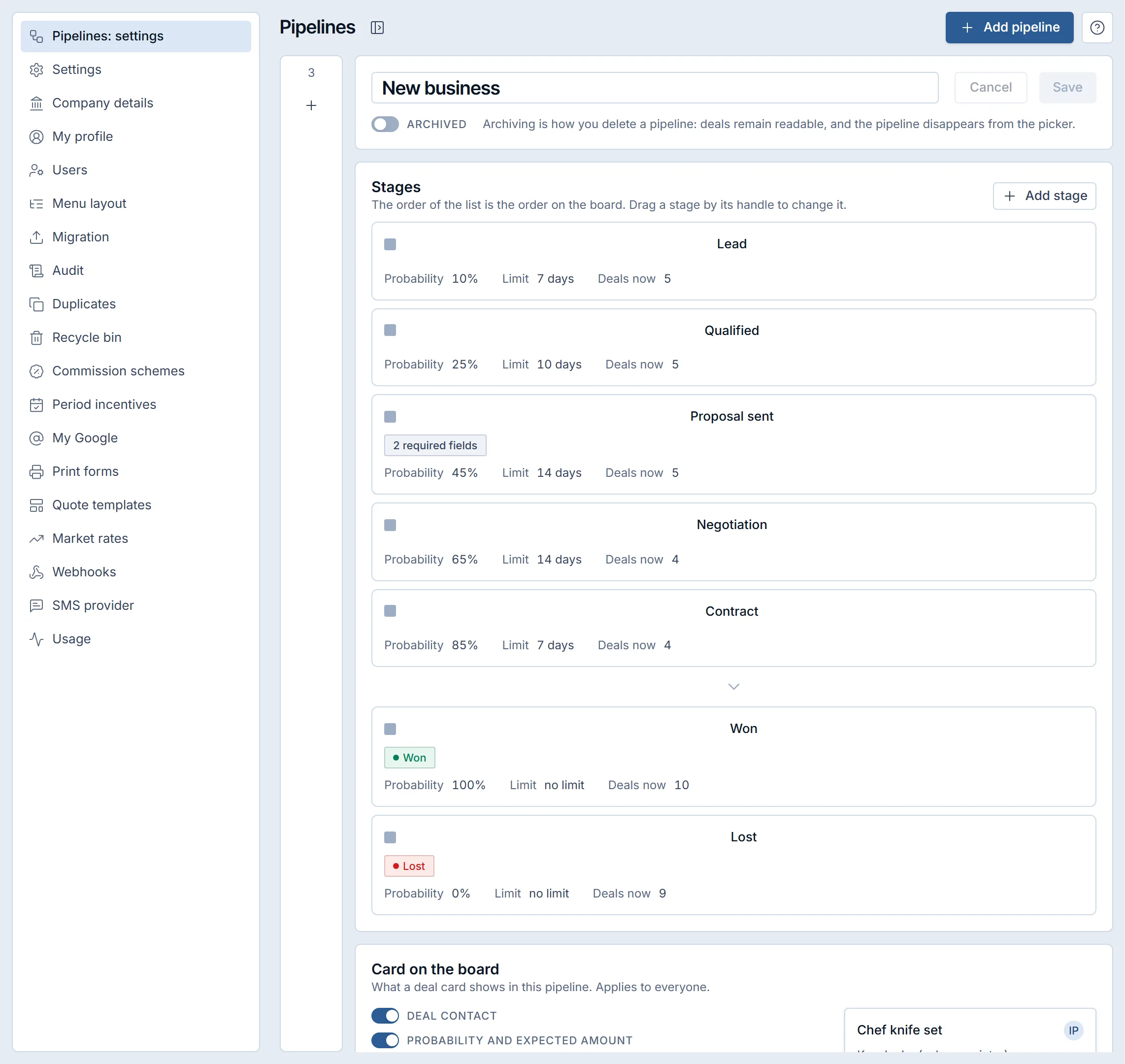
In the pipeline settings every stage carries its probability, its limit in days and the number of deals now, and closing stages can stay without a limit. On the board, the day count of a deal over the limit of its stage turns red, and the person responsible for the deal receives a notification. The days are counted from the last movement of the deal, a stage change or a recorded activity, in calendar days of the company time zone, so a deal that gets regular work does not raise alerts. The notification repeats only when the deal moves again and then goes quiet again, and a deal paused until a future date does not count as stalled.
The deals list has a ready preset called Stalled that shows open deals over the limit of their stage, and the stalled days can be shown as a column from the column menu. Rows with a delay are highlighted. A separate filter for silent deals offers 7, 14, 30, 60 and 90 days and works differently. It looks for deals without any recorded activity for that long, starts from the creation date when a deal never had an activity, and leaves closed deals out. Use the preset for the weekly review, and use the silent filter for deals whose stage has no limit.
For follow-up, an automation rule with the trigger “deal with no movement for N days” creates a task for the deal owner. The rule can be limited to a pipeline, a source, a manager or a stage. It fires once for a quiet period and fires again only after the deal gets new activity and then falls silent again. The Automations screen belongs to the Money plan and higher, and its sample menu offers a ready rule for a stalled deal, while the guide on CRM automation examples collects more rules of this kind. The page about task rules for silent deals in Krokul describes the available triggers and actions.
To tune the limits, the funnel report shows the average time on each stage for the deals of the chosen period, including the deals that still stand there. The guide on stage conversion and cohort analysis shows how to read that report, and the page on stage limits and stalled-deal tracking in Krokul covers the settings.
Frequently asked questions#
How many days without movement make a deal stalled?
It depends on the stage, so there is no single number. Set the limit slightly above the time a healthy deal normally spends there, for example seven days for a new inquiry and fourteen for a stage with a proposal out, and adjust it after a month of data.
Does a deal in a stage without a limit count as stalled?
No, because without a limit there is nothing to compare with. Krokul marks as stalled only deals in stages that have a limit, so use the silent-deal filter or an automation rule to watch the rest.
What is the difference between a stalled deal and a silent deal?
A stalled deal is over the limit of its own stage, and a silent deal has had no recorded activity for a chosen number of days. A stalled deal needs a limit per stage, and a silent deal needs one number for the whole pipeline.
Who receives the task for a silent deal?
The person responsible for the deal receives it, as long as the deal has one. In Krokul the task from an automation rule goes to the deal owner, and the rule can be limited to one pipeline, source, manager or stage.
When should I close a stalled deal as lost?
Close it after the follow-ups you agreed have gone unanswered and the buyer has named no date. Krokul asks for a lost reason when a deal is closed as lost, and the reasons later show why deals disappear.