Short answer
To quote B2B prices fast and get them right, keep prices in price lists tied to each client’s terms, let quantity breaks and dated rules lower the price automatically, cap manual discounts by role with an approval path for exceptions, set a floor price, and create the contract and invoice from the approved quote.
- Steps: seven
- Price comes from: price list, quantity, rules, client terms
- You need: a price list and discount limits
On this page
- Short answer
- Why quotes go slow and wrong
- The 7-step method
- Building a price
- Different prices per client
- Volume discounts
- Discount caps and approval
- Floor price
- Locking the exchange rate
- Quotes with options
- From quote to invoice
- Quote and invoice templates
- Price lists in ERP or CRM
- Common mistakes
- Where to start
- FAQ
Why B2B quotes go out slow and wrong#
Slow and wrong quotes share a root. The price lives in several spreadsheets, each client has terms that only one person remembers, and every discount is a negotiation in a chat. The sales rep spends an hour on a quote that should take ten minutes, and the margin on it is a guess.
The fix is to turn each of those habits into data. Prices go into price lists, client terms become records attached to the client, discount limits become settings by role and every exception leaves a decision on file. The seven steps below follow that order, and the sections after them answer each question in more depth.
- Price list
- A price list is a table of prices for products and services, optionally with different prices for different quantities and a validity period.
- Quantity break
- A quantity break is a lower unit price that applies once an order line reaches a set quantity, for example from 10 units.
- Discount cap
- A discount cap is the largest discount a role can give without approval.
- Floor price
- A floor price is the lowest unit price at which a product may be sold, whatever discounts are applied.
- Quote
- A quote is a document that offers a client specific products or services at specific prices for a limited time.
The 7-step method for quoting B2B prices#
Krokul CRM is a B2B CRM for contract-based companies: deals, projects and profit per client in one system, implemented by integration partners. The method works with any tool, and the steps name the Krokul screen where one exists.
Put every price into a price list
Collect the prices that live in spreadsheets, old quotes and people’s heads into one price list per client tier, such as retail, dealer and project. A price that is not in a list cannot be calculated, checked or changed in one place.
In Krokul, the Pricing screen has a tab for price lists. Each list has a currency, a validity period and a default flag, and a list can be copied from another.
Attach terms to each client
Record which price list a client uses, the personal discount they negotiated and their payment terms. The rep then stops asking which price applies, because the client record already says.
In Krokul, client terms hold a price list, a personal discount from 0 to 100 percent, a currency, a payment deferral and a credit limit. They can belong to a client company, a contact or a segment, and they can have an end date.
Set quantity breaks and dated discount rules
Write volume prices as breaks in the list, and write promotions as rules with a start and end date. A promotion that turns itself off cannot outlive its plan, and a break cannot be forgotten at the moment of quoting.
Krokul applies the break with the highest quantity not above the line quantity. Discount rules can set a percentage, an amount, a fixed price or another price list, and apply by product, client, segment, minimum quantity or weekday.
Check where each price came from before you send
Calculate a price for one product, one client and one quantity, and read the steps. If the result surprises you, the explanation shows which list, rule or term caused it, so you fix the cause behind it.
The Calculate price panel in Krokul lists every step in order: price list, rules, client terms and rounding. A step that did not apply is dimmed and explained.
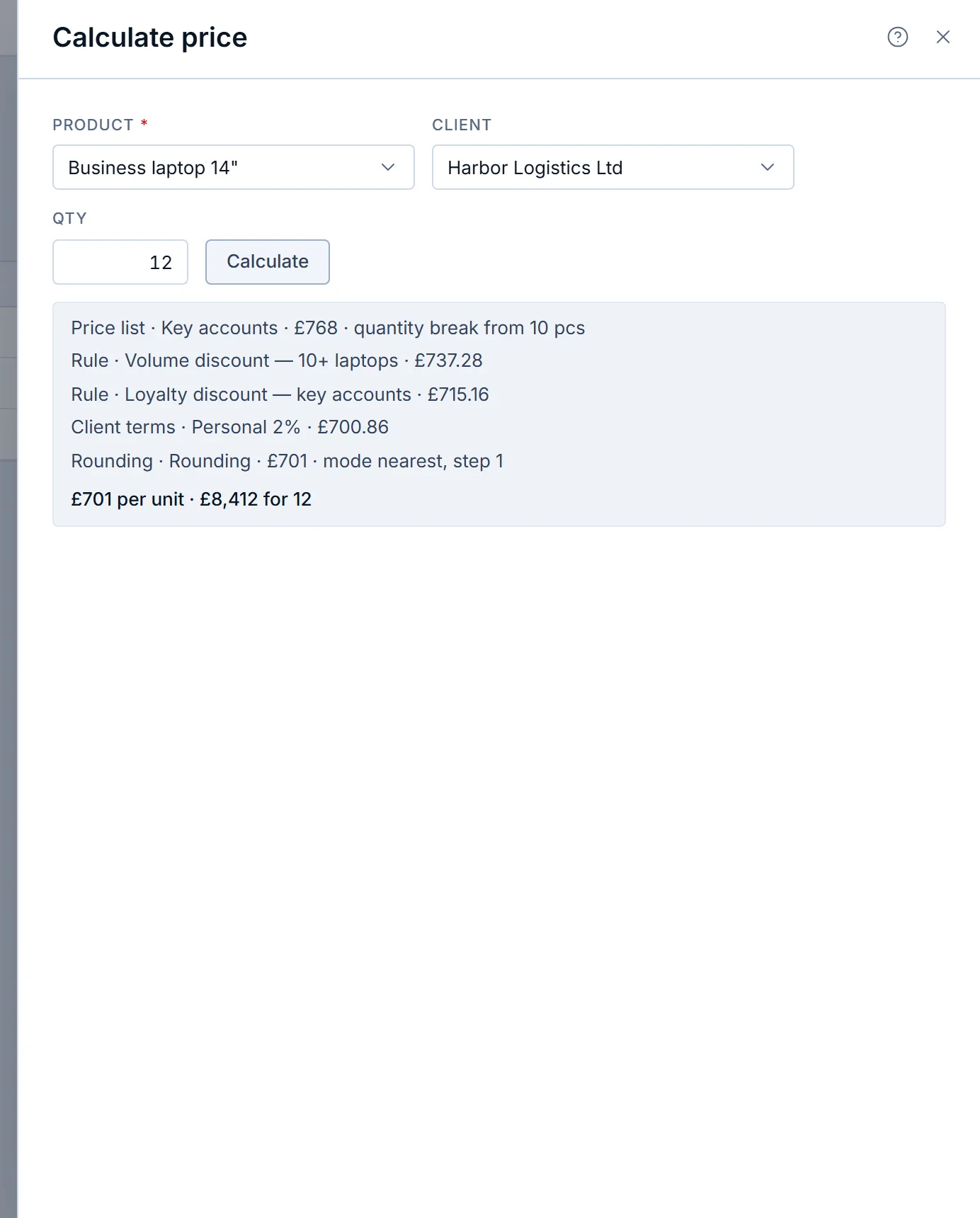
Calculate price in a Krokul demo workspace: the price for one client and quantity, step by step. Cap discounts by role
Give each role a limit, for example 5 percent for a junior rep and 20 percent for a manager. A discount inside the limit needs no one’s attention, and a discount above it waits for a decision.
Krokul ships with caps of 5 percent for agents and 20 percent for managers, and an administrator can change them. Above 10 percent, the rep must also write a reason.
Send exceptions for approval and keep the decision
When the client asks for more than the cap, the rep requests approval for a specific percentage and explains why. The approver sees the request, decides, and the decision stays on the deal.
In Krokul, the approver must be someone whose own cap covers the percentage, and nobody approves their own request.
Create the contract and invoice from the approved quote
Once the client says yes, generate the next document from the quote so the lines, prices and totals carry over. Retyping is where a quote and its invoice drift apart.
Krokul creates a contract or an invoice from a quote in one action and from the deal in another, with the lines and prices of the quote.
How a B2B price is built from list price to final price#
A B2B unit price is built in a fixed order, and the order decides the result. Start with the price from the list at the quantity ordered, apply each discount rule, then the client’s personal discount, then the floor price and finally the rounding. A fixed order makes the same quote come out the same way for every rep.
| Step | What happens | Unit price |
|---|---|---|
| Price list “Key accounts” | The break from 10 units applies | £768.00 |
| Rule “Volume discount, 10+ laptops” | 4 percent off | £737.28 |
| Rule “Loyalty discount, key accounts” | 3 percent off the previous result | £715.16 |
| Client terms | Personal discount of 2 percent | £700.86 |
| Rounding | Nearest whole pound | £701.00 |
The line total is 12 × £701 = £8,412. Krokul shows the same sequence in its price calculation, and the figures above come from a demo workspace set to apply discounts one after another. In a new Krokul workspace the default policy applies only the best single discount, and a company can switch to the sequential policy or to adding discounts up. Choose the policy before you write rules, because it changes what two overlapping rules mean.
Tip. When two rules tie on the same product and client, or discounts are applied one after another, put the more specific rule higher in the list. On equal priority the rule for a client company wins over the rule for a segment.
How to set different prices for different customers#
Different prices for different clients work when each client resolves to one price list and the rules for exceptions are written down. The guide on setting different prices for different customers shows the setup. The short version is a queue of sources, checked in order until one has a price.
| Order | Source | When it applies |
|---|---|---|
| 1 | Price list named by a matching discount rule | A rule with the effect “another price list” applies to the client or product |
| 2 | Price list from the client’s terms | The client has terms with a price list and they have not expired |
| 3 | Default price list from the pricing settings | The company chose one |
| 4 | Price list marked as the default | No other source gave a price |
| 5 | Price on the product card | No list has a line for this product and quantity |
A list that is archived or outside its validity period is skipped. When a list is in a different currency from the deal, Krokul converts the price at the company’s rate, and a list is skipped when either currency has no rate. For setup details, see the price lists and client tiers page.
How to structure volume discounts and quantity breaks#
A quantity break is a price that changes at set quantities, and it belongs in the price list, next to the base price. The guide on structuring volume discounts compares breaks with percentage rules. Breaks are easier to read, and rules are easier to date.
| Quantity ordered | Break that applies | Unit price |
|---|---|---|
| 1 to 9 | From 0 | £850 |
| 10 to 49 | From 10 | £768 |
| 50 or more | From 50 | £720 |
Krokul picks the line with the largest break that does not exceed the quantity, so an order of 12 uses the price from 10. Set the first break at 0, because a first break at 1 leaves a fractional quantity such as 0.5 kg without a price. When every break is above the quantity, the list has no price for the line and the next source in the queue answers.
How to cap sales discounts by role and approve exceptions#
A discount cap by role lets a rep close routine deals alone and sends the unusual ones to someone with more authority. The guide on capping discounts and approving exceptions covers the full workflow. The structure fits in one table.
| Requested discount | Who decides | What is recorded |
|---|---|---|
| Up to 5 percent | The rep | The discount on the line |
| 6 to 20 percent | A manager, or the rep if their cap allows | A reason when above 10 percent |
| Above 20 percent | An approver whose own cap covers it | The request, the reason and the decision |
In Krokul, the request carries a percentage and a justification, and the approver sees both. A rejection needs a reason, so the rep knows what to change. When the approval is granted, the deal’s ceiling rises to the approved percentage, and that approved discount carries into documents created from the deal.
Companies with a longer chain can build an approval route. A route has steps, each assigned to a role or a person, with a threshold such as “from 15 percent”, and a step can run in parallel with the previous one. Any rejection rejects the request, and changing a route does not rewrite requests that are already open.
How to stop selling below a floor price#
A floor price is a lower limit on the unit price that no stack of discounts can cross. The guide on setting a minimum selling price shows how to choose the number. It protects margin on the products where several discounts tend to pile up.
| Step | Price per unit |
|---|---|
| List price | £850 |
| After a 10 percent promotion | £765 |
| Floor price on the list line | £790 |
| Price on the quote | £790 |
In Krokul, discounts from rules, client terms and promo codes cannot take the price under the floor, and the price calculation shows a separate “Minimum price” step. A price typed by hand below the floor is accepted only from an administrator. A discount rule can also carry a margin threshold, and then managers and agents cannot apply a discount that pushes the line’s margin under it, while an administrator confirms it explicitly.
Cost and margin are visible to administrators and managers. Other roles get the refusal without the margin figure.
How to lock the exchange rate on a foreign-currency deal#
To lock the exchange rate on a foreign-currency deal, record the rate at the moment the deal is won and keep it for every document that follows. The guide on locking the exchange rate on a deal explains when to lock. The table shows what changes and what does not.
| Moment | Rate (£ per €1) | Deal in pounds |
|---|---|---|
| Deal created | 0.85 | £8,500 |
| Deal edited a week later | 0.86 | £8,600 |
| Deal won | 0.87 | £8,700 |
| Market rate a month later | 0.90 | Still £8,700 |
Krokul refreshes the rate each time an open deal is edited and freezes it when the deal is won or lost. A document freezes its rate when it is created and never updates it afterwards, so an invoice keeps the rate it was issued at.
How to send a quote with several options#
A quote with options gives the client two or three complete offers to choose from, usually good, better and best. The guide on sending a quote with several options covers naming and ordering them. Each option is a quote of its own, and together they form one choice.
| Option | Scope | Total |
|---|---|---|
| Basic | Licences and remote setup | £12,000 |
| Extended | Basic plus data migration and training | £18,500 |
| Extended with on-site installation | Extended plus two days on site | £21,000 |
In Krokul, you create one quote per option, then mark from 2 to 10 quotes of the same deal as alternatives. When the client picks one, you create the invoice or contract from the chosen quote. That choice marks the quote as approved and the others as rejected, and the deal amount becomes the amount of the chosen quote.
How to turn a quote into a contract and invoice without retyping#
You turn a quote into a contract and invoice without retyping by creating each document from the previous one, so lines, prices and totals are copied by the system. The guide on turning a quote into a contract and invoice walks through the sequence.
Krokul offers a contract or an invoice from a quote, and an act or an invoice from a contract. A document made from a deal takes the lines and quantities you choose, arrives as a draft and keeps each line’s price as it was. The quantity cannot exceed what the deal agreed. Corrections to an issued document go in a new version, which opens as a draft with the same lines.
The quotes in Krokul page shows the whole path from the catalog to the invoice.
How to build a quote and invoice template clients trust#
A quote template has two parts. The composition template fixes the lines you offer most often, and the print form fixes how the document looks, with your details, terms and signature block. The guide on building a quote and invoice template covers the content that makes clients trust the page.
- The company details and the client’s legal name, spelled the way the contract spells them.
- Line items with unit, quantity, unit price and total, so the arithmetic can be checked at a glance.
- The validity date of the offer and the payment terms.
- Delivery or start date, and who the client contacts with questions.
In Krokul, you save the lines of a quote as a template from the document card menu and create new quotes from it. Print forms are set up separately, so one blank can serve every quote.
Where B2B price lists should live: ERP or CRM#
B2B price lists should live where the people who change them and the people who use them can both reach them without a handover. The guide on price lists in the ERP or in the CRM develops the decision. Four questions settle most cases.
| Question | Points to the ERP | Points to the CRM |
|---|---|---|
| Who changes prices? | Finance, rarely | Sales operations, often |
| Who needs the price while quoting? | Someone who can open the ERP | Every rep, inside the deal |
| Do client terms change per deal? | No, terms are fixed | Yes, tiers, dates and exceptions vary |
| Does the rep need to see why the price is what it is? | No | Yes, with the rules behind it |
Krokul keeps price lists, rules and client terms in the CRM and explains each calculated price. A list can be filled in batches of up to 500 items per call, so a master list kept elsewhere can be sent to Krokul by an integration.
Which quoting mistakes cost the most#
- Copying last year’s quote for a new client. Another client’s name and old prices stay in the text; build each quote from the price list and the client’s terms.
- Letting every rep decide discounts. Margin leaks quietly; set a cap per role and route the rest for approval.
- Applying a promotion with no end date. Quotes keep going out at the promotional price; give every rule a validity period.
- Sending three separate files as options. The client picks one and the invoice follows another; mark the quotes as alternatives of one deal.
- Retyping the quote into an invoice. A small difference in a total becomes a dispute; create the invoice from the quote.
Where to start: a decision table#
Pick the symptom that matches your quoting today and start with that guide. Each row is a change you can make in a week.
| Symptom | First fix | Guide |
|---|---|---|
| Reps quote different prices to the same client | One price list per client tier | Customer-specific pricing |
| Big orders get the same price as small ones | Add quantity breaks | Volume discount tiers |
| Nobody knows who approved a discount | Cap by role, route the rest | Discount approval workflow |
| Discounts stack below cost | Set a floor price | Minimum selling price |
| Invoices differ from the quotes behind them | Create documents from the quote | Quote to invoice |
Frequently asked questions#
How long should a B2B quote stay valid?
A B2B quote should state its validity in days or by a date, and 14 to 30 days is a common choice for products with stable prices. Shorten it for goods with volatile costs and lengthen it for large projects that need internal approvals on the client side.
Should a quote show the discount or only the final price?
Show the list price, the discount and the final price when the client is comparing offers or the discount was negotiated. Show only the final price when the client buys at standard terms and the discount is not part of the conversation.
How many price lists does a B2B company need?
Start with one price list per client tier and add a separate list only when a group of clients has prices that cannot be described as a discount on another list. Many companies need two to four lists plus occasional project lists.
Can a sales rep see cost and margin?
In Krokul, administrators and managers see cost and margin, and other roles do not. A rep who requests more discount than the cap gets the refusal and can ask an approver, without seeing the margin figure.
What happens when prices change after a quote was sent?
The sent document keeps its prices, and a change goes into a new version of the document. In Krokul, a new version opens as a draft with the same lines, so you review each price before issuing it.
Does every discount need approval?
No, only a discount above the role’s cap needs approval. The cap lets reps close routine deals on their own, and the approval path handles the rest.