Short answer
To set different prices for different customers, put prices into price lists by client tier, record which list and which personal discount each client receives, give every agreement an end date and fix the order in which the sources are checked. The system then returns the same price for the same client every time.
- Steps: six
- You need: price lists and client terms
- Result: one price per client and product
On this page
When one price for everyone stops working#
- Two reps quote the same product to the same client at two different prices.
- A dealer gets a better price than the agreement says, because someone promised it by phone.
- A discount agreed for one quarter is still on the quotes a year later.
- The price list lives in several spreadsheets, and nobody knows which one is current.
Each of these is a missing record. This guide is one part of the method for quoting B2B prices fast and getting them right, and it covers the first decision, which price a client gets.
What customer-specific pricing is made of#
Customer-specific pricing is a price that depends on who the client is, and it needs only four records. Define them once and every quote after that reads from them.
- Client tier
- A client tier is a group of clients who get the same prices, such as retail, dealer and distributor.
- Price list
- A price list is a table of prices for products and services, and one list usually serves one tier.
- Client terms
- Client terms are the record of what one client or segment has agreed: the price list, a personal discount, payment terms and an end date.
- Personal discount
- A personal discount is a percentage taken off the list price for one client, on top of the tier.
How to set different prices for different customers in six steps#
Group clients into three or four tiers
Sort clients by what they buy and how they buy it, for example retail, dealer, distributor and project. A tier is a group with one price logic, so a new client needs a tier and nothing more.
Keep the number small. Every extra tier is one more list that somebody has to keep current.
Build one price list per tier
Start with the base list and derive the others from it. A dealer list is the base list minus 12 percent, and a distributor list is the base list minus 20 percent, so every list starts from the same base prices.
Add a separate list only when a group has prices that cannot be written as a discount on another list.
Record the terms of each client
For every client with an individual agreement, write down the tier, the personal discount, the payment deferral and the credit limit. Put an end date on anything that was agreed for a period.
A client without a record falls back to the default list, which is the safest place for a new account.
Decide which agreement wins when several apply
A person can have terms, the client company can have terms, and the whole segment can have terms. Fix the order, and let exactly one record win. The most specific agreement should come first: the person, then the company, then its parent company in a holding, then the segment.
Partial mixing of two records produces prices that nobody can reproduce, so one record wins in full.
Decide how a personal discount meets a promotion
When a client has a personal discount and a promotion applies to the same product, two policies are possible. The first gives the client the better of the two. The second applies the discounts one after another, which gives a lower price.
Choose the policy before you write the rules, because the same two discounts produce different prices under each policy. Capping discounts by role belongs to the same decision, and the guide on capping discounts and approving exceptions covers it.
Check the price for a sample client before you announce it
Take one product, one client and one quantity, calculate the price and read how it was built. A result that surprises you points to the list, discount or agreement that caused it.
Then put the end dates in a calendar. A date that nobody reviews is the usual reason an old price stays in force.
Tip. Quantity breaks live inside the list, next to the base price. The guide on structuring volume discounts shows how to set them.
How a client’s price comes out of a tier and a personal discount#
The unit price is the list price of the client’s tier multiplied by one minus the personal discount. The table shows one product and four clients.
| Client | Price list | List price | Personal discount | Unit price |
|---|---|---|---|---|
| Client A | Retail | £1,000.00 | none | £1,000.00 |
| Client B | Dealer | £880.00 | none | £880.00 |
| Client C | Dealer | £880.00 | 3 percent | £853.60 |
| Client D | Distributor | £800.00 | 5 percent | £760.00 |
Client C pays £880.00 × (1 − 0.03) = £853.60 per unit, and an order of ten units costs £8,536.00. Every rep who looks up Client C gets this number, and a change to the dealer list moves it for every dealer at once.
Which agreement applies when a client has several#
The agreement that applies is the first live record found in a fixed order, and an agreement past its end date counts as missing. The table shows one client over time.
| Situation | Terms that apply |
|---|---|
| The buyer has personal terms that are still valid | The buyer’s personal terms |
| The personal terms ended last week | The terms of the buyer’s company |
| The company terms ended as well, and the company sits in a holding with its own terms | The terms of the nearest parent company |
| No parent terms exist, and the client belongs to a segment with terms | The segment terms |
| No valid terms at any level | The default price list |
Note the second row. On the day personal terms end, the price falls to the company agreement, and it does not jump back to the base list. That is why every end date needs a review before it arrives.
Which mistakes make client prices drift#
- Creating one price list per client. A hundred lists cannot be kept current; group clients into tiers and keep only exceptions as personal discounts.
- Keeping agreements in chat or in memory. The next rep quotes the list price; record every agreement against the client.
- Leaving out the end date. A quarterly deal becomes permanent; set a date on every agreement that has a period.
- Giving the same client a tier price and a hand-typed discount on top. Nobody can explain the result later; put the discount in the client’s record.
- Archiving a list that clients still use. Quotes then fall back to another list; check which clients use a list before you retire it.
A client terms sheet to copy#
Fill in this sheet for every client that has an individual agreement, and keep it next to the contract.
- Client, and whether the terms belong to the company, one contact or a whole segment.
- Tier and price list.
- Personal discount in percent, or none.
- Currency of settlement.
- Payment deferral in days and credit limit.
- Start and end dates of the agreement.
- Who agreed it and when the next review is.
How to set different prices for different customers in Krokul#
Krokul CRM is a B2B CRM for contract-based companies: deals, projects and profit per client in one system, implemented by integration partners. The same records exist in it as screens: price lists, discount rules and client terms sit on the Pricing screen.
You create a price list per tier and copy a list when the tiers share most prices. The copy is a snapshot of the items with their prices, so after the base list changes you refresh each copy, and the currency, rounding and period start with standard values. Through the API a copy can also carry a markup between −100 and 1,000 percent. A list that is assigned in active client terms cannot be archived until you change those terms.
Client terms hold a price list, a personal discount from 0 to 100 percent, a settlement currency, a payment deferral, a credit limit, a validity period, a priority and a note. They can belong to a client company, a contact or a segment, and each addressee has exactly one record, so new terms replace the old ones. Krokul reads them in the order from the table above, including the nearest parent company in a holding, and treats expired terms as missing.
A price is then built in a fixed order: the price list, the quantity break, the discount rules together with the personal discount, a manual price, and rounding. The default policy applies the best single discount, and a company can switch to applying discounts one after another or adding them up. The Calculate price panel shows each of these steps for one product, client and quantity, and dims a step that did not apply with the reason next to it.
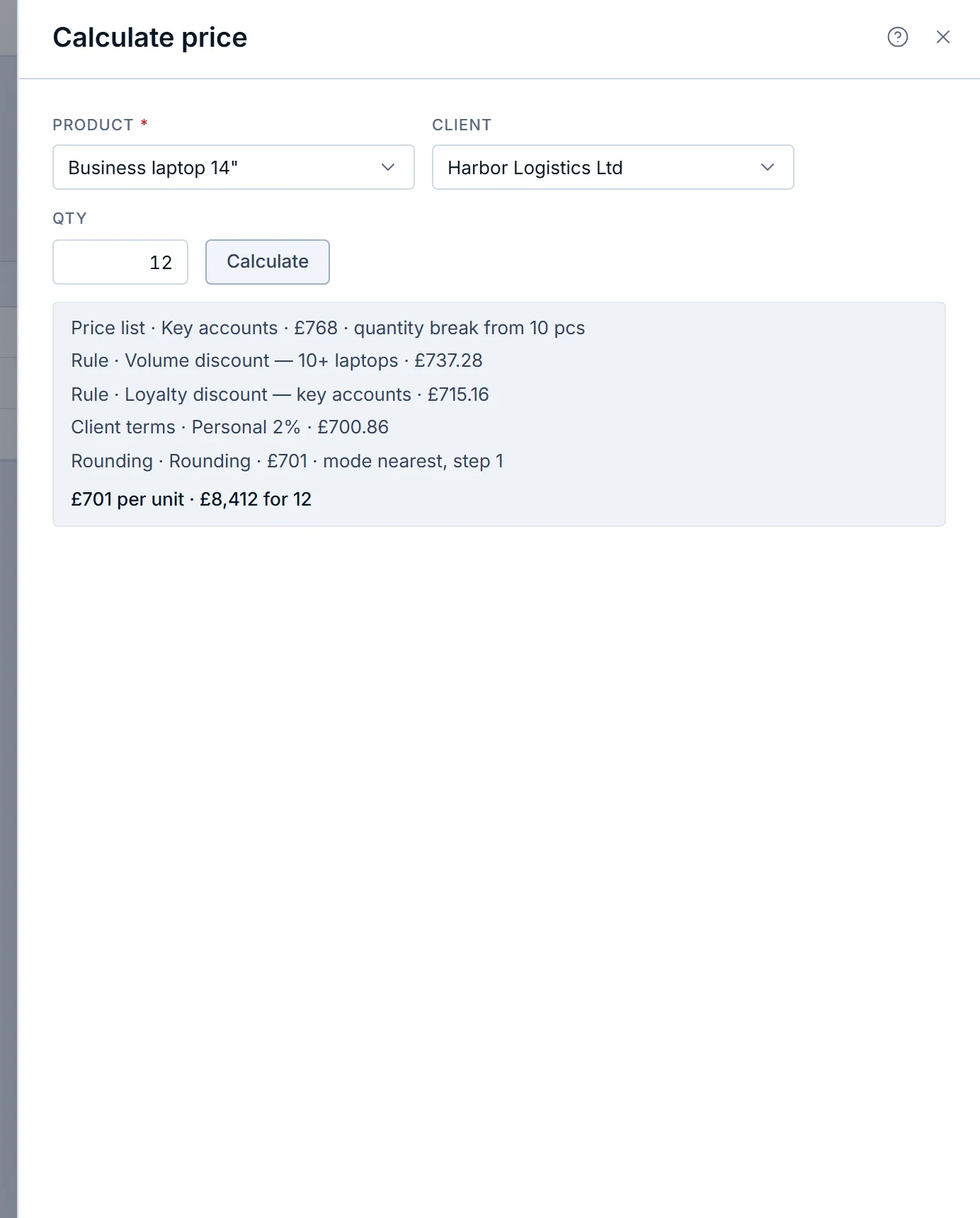
For the full picture of lists, tiers and rules, read about price lists and client tiers in Krokul.
Frequently asked questions#
Can one client have two price lists?
Yes, through a discount rule. A client’s terms point to one price list, and a rule with the effect “another price list” can switch matching products to a different list for that client. Keep such rules few, because each one adds a place where a price can come from.
What happens to a client’s price when the agreement ends?
The record counts as missing, and the price comes from the next level in the order: the company terms, then a parent company, then the segment, then the default price list. Review end dates in advance, so that every change is planned.
Can a sales rep override a client’s price?
A rep can lower the price within the discount cap of their role. In Krokul the default caps are 5 percent for agents and 20 percent for managers, and Krokul refuses a discount above the cap. The rep can then ask for approval from the deal card.
How many price lists does a B2B company need?
Start with one list per client tier and add another only when a group of clients has prices that cannot be written as a discount on an existing list.