Short answer
A multi-currency CRM needs a base currency and dated exchange rates. In Krokul you choose the base currency, record a dated rate for each foreign currency in the Currencies screen, and decide whether rates update by hand or hourly from the National Bank of Ukraine. Every amount then stores its rate and base equivalent.
- Steps: five
- Rate unit: base currency per one foreign unit
- Auto source: NBU, hourly
On this page
When a second currency starts to cause errors#
- A quote in dollars is converted into the reporting currency at whatever rate somebody had in mind that day.
- Last month’s invoices change their base amounts after the rate table is edited.
- A price list in euros is used for a deal in pounds, and the rep converts the price on a calculator.
- Nobody can say which rate produced the number in the revenue report.
This guide covers the settings behind the decision described in locking the exchange rate on a deal, as one part of the method for quoting B2B prices fast and getting them right. That guide decides when the rate of one deal becomes fixed, while this one sets up the rates, their journal and the sources every amount draws from. The sample company reports in pounds and sells partly in dollars.
Choose the base currency
Open the Currencies screen and pick the base currency, the one the company reports in. Every foreign amount gets an equivalent in it, and the rate is stored on the amount itself.
Decide this once. Changing it later recalculates the frozen rates in deals, documents and payments, and Krokul refuses the change when a rate of the new base is missing for some date and names that date.
Record the first rate of each foreign currency
Select a currency in the list, choose the date from which the rate applies and enter the rate, which is the number of base units in one unit of the currency. A rate can be entered for a past date, and the journal then shows that it was entered by hand and when.
A second rate on the same date replaces the first one, so a correction does not leave two numbers.
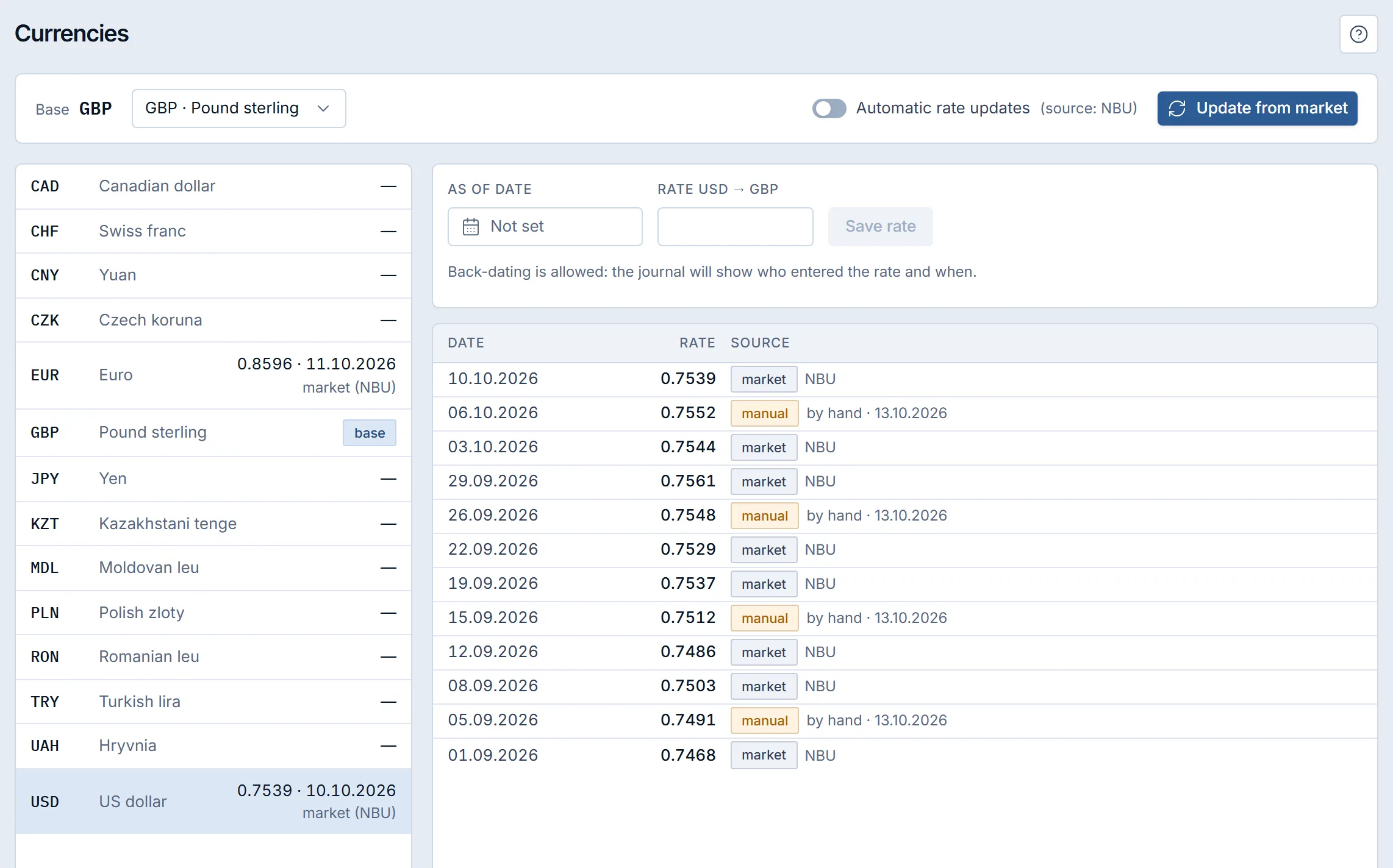
The Currencies screen of a demo company: base GBP, and the journal of USD to GBP rates with manual and market rows. Choose between manual and automatic updates
The automatic update is off by default. An administrator switches it on, and Krokul then writes the official rate of the National Bank of Ukraine once an hour for the currencies that already have a rate in the journal.
With the update on, a manual rate for today is replaced by the source rate, so keep the switch off while you work with your own rate. If the source is silent for one to three days, Krokul writes the last known rate with a notice of its age, and after three days it stops and asks for a rate by hand.
Use the market rates screen as a reference
The Market rates screen lists six sources, among them the official rate and bank rates, with buy and sell values where the source gives them. It reads only, and it does not change any amount in the company.
A market rate enters the company’s journal in two ways: through the automatic update of step 3, or when an administrator or a manager presses Update from market on the Currencies screen, which writes today’s rates of the active currencies except the base.
Let price lists in another currency convert
When a price list is in a currency other than the deal, Krokul converts the price at the company rate once, on the base price, before any discounts. If a rate of one of the two currencies is missing, the list is skipped.
Quantity breaks and discount rules then work on the converted price, as in structuring volume discounts. A role’s manual discount cap is a percentage, so it means the same in any currency, and the guide on capping discounts by role covers it.
How one rate journal prices two dates#
Krokul uses the rate with the latest date that is not later than the date of the amount. The table shows an invoice of 10,000 US dollars in a company that reports in pounds, with the journal of the frame above.
| Document date | Rate used | Date of that rate | Base equivalent |
|---|---|---|---|
| 10.10.2026 | 0.7539 | 10.10.2026 (market, NBU) | £7,539.00 |
| 08.10.2026 | 0.7552 | 06.10.2026 (manual) | £7,552.00 |
The base equivalent is the amount multiplied by the rate, so 10,000 × 0.7552 = £7,552.00 for the earlier date. An amount that is already saved keeps its rate, and a rate entered later with a past date changes only the amounts saved after it. Payments carry a frozen rate in the same way, and recording B2B payments and payment schedules shows where it appears.
Keep the journal dense enough to be useful. A currency that moves daily needs a rate for every working day that you invoice in it, and with the automatic update on the journal fills itself, so hand-entered rows are needed for the first rate and for corrections only.
Who can change currency and exchange rate settings#
Every role sees the currencies and the journal. An administrator and a manager record rates and update them from the market, and only an administrator changes the base currency or switches the automatic update on.
Which currency mistakes distort reports#
- Switching automatic updates on before a currency has any rate. The update serves only currencies that already have a rate, so record the first rate by hand.
- Editing rates to fix a report. Saved amounts keep their frozen rate, so the report does not change, and only new amounts are affected.
- Changing the base currency in the middle of a quarter. Frozen rates are recalculated, so choose the base at the start.
- Reading the Market rates screen as the company rate. It is a reference, and the company rate is the one in the Currencies journal; check that journal after pressing Update from market.
A multi-currency setup checklist#
- The base currency chosen before the first foreign deal.
- A first rate recorded for every currency in use.
- The automatic update either on or consciously off.
- Price lists in foreign currencies checked with Calculate price for one deal.
- A named person who watches the update notices.
For the overview of foreign-currency deals, read about currencies and exchange rates in Krokul.
Frequently asked questions#
Does a new rate change old invoices in Krokul?
No. Every amount keeps the rate that was frozen on it. A new rate affects only amounts saved after it, even when its date is in the past.
Where do automatic rates come from?
From the official rate of the National Bank of Ukraine, once an hour, for currencies that already have a rate. On the Currencies screen another source or a markup cannot be set.
Can I use the Market rates screen to set my rate?
No. The screen is for reading. A market rate enters the company’s journal through the automatic update or the Update from market button on the Currencies screen.
Who can change the base currency?
Only an administrator, and Krokul shows the consequences before the change, because the frozen rates are recalculated.