Short answer
Krokul has seven CRM document types: quote, invoice, completion certificate, delivery note, return, contract and supplier order. A quote becomes an invoice or a contract, a contract becomes a certificate or an invoice, and an issued document is corrected with a new version, which keeps the payments and moves the old edition to the archive.
- Document types: seven
- Correction: a new version
- Screen: Documents
On this page
When one document type is not enough#
- The quote is in a spreadsheet, the contract in a lawyer’s template and the invoice in accounting software, and the amounts differ.
- A client asks for a corrected invoice, and the old file stays in the inbox next to the new one.
- Work is accepted in stages, and nobody knows which stages already have a certificate.
- A distributor ships goods on an invoice and needs a delivery note made from the deal and a possible return.
The principles are covered in the guide on quoting B2B prices fast and getting them right. The order of work below follows one deal of an integrator, Northwind Integrations in the demo workspace. The quote lines come from the product picker.
Which CRM document type to use: quote, contract or invoice?#
Each document type has its own numbering, and every type moves through four states: draft, issued, completed and cancelled. A type names those states in its own words, so a quote ends as approved or rejected and an invoice ends as paid.
| Document | Use it to | Can be made from |
|---|---|---|
| Quote | offer prices and line items to the client, with options | a deal, or a client without a deal |
| Contract | record terms, stages and the subscription period | a quote |
| Invoice | ask for payment, in one amount or by stages | a quote, a contract, a completion certificate |
| Completion certificate | confirm that work was done | a contract or an invoice |
| Delivery note | ship goods | an invoice |
| Return | take goods back after a sale | a delivery note |
| Supplier order | order goods from a supplier and receive them against it | a supplier and line items |
Create the quote from the deal
Open the deal card, create a document and choose the quote. The line items of the deal come with it, and a quote can also be created for a client without a deal.
A draft can be edited freely and already has a number. When you issue the quote it moves to the “under review” state.
Make the contract or invoice from the approved quote
Use the Make based on action in the document menu. From a quote you can make an invoice or a contract, from a contract a completion certificate or an invoice, from a certificate an invoice, and from an invoice a certificate or a delivery note.
Krokul takes the line items over, so nobody retypes them, and any other conversion is refused with a message.
Issue stages instead of the whole amount
For a contract with stages, open the contract and choose the certificate or the invoice from stages. Tick the stages that are done, and a stage that is fully completed cannot be selected again.
The frame shows the dialog for a demo company: stages 1 and 2 are finished, and £9,200 and £5,500 remain on stages 3 and 4.
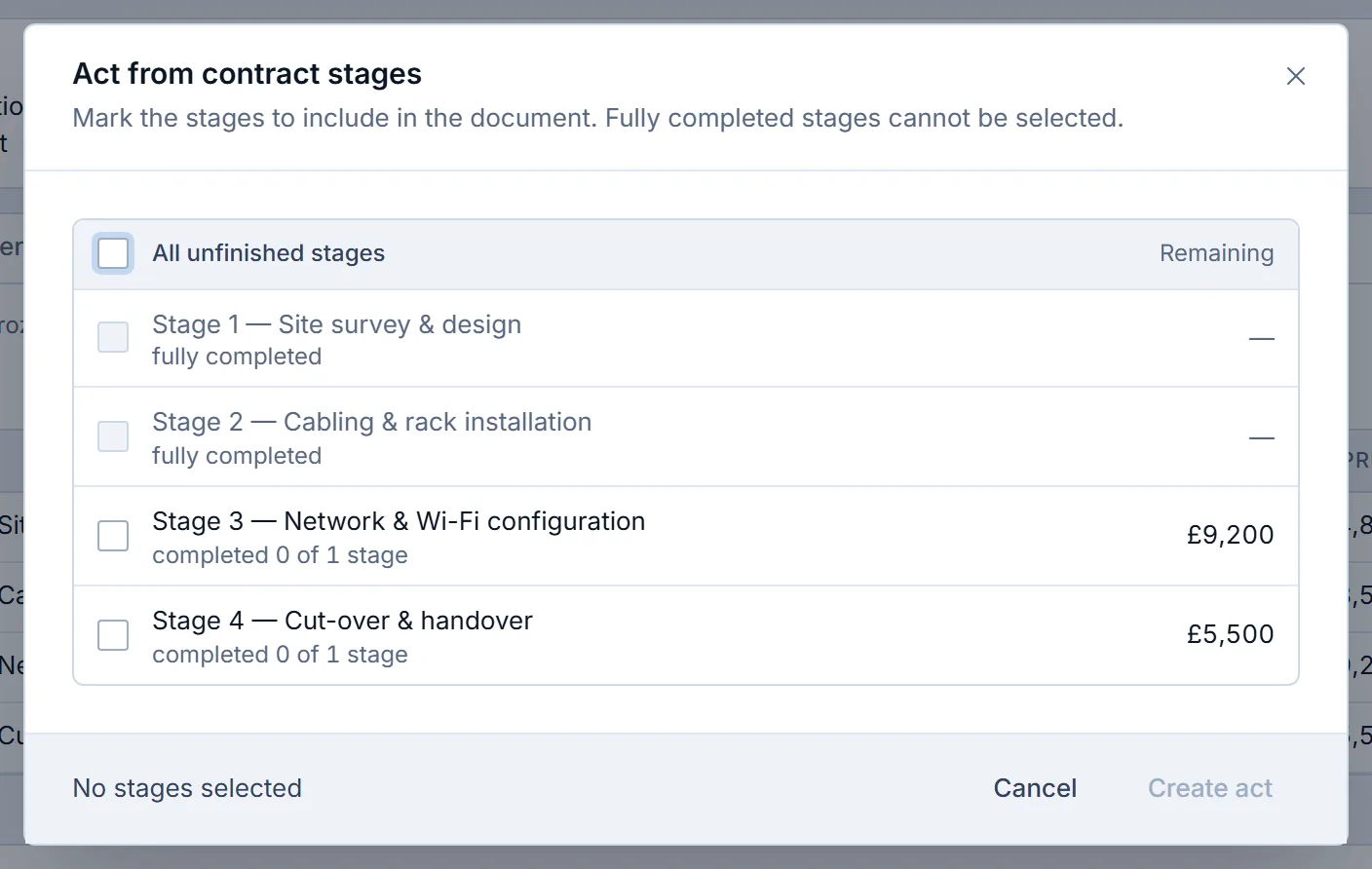
A different screen: the stage picker of a contract in a demo company. The same Make based on route builds invoices from a quote. Correct an issued document with a new version
An issued document is frozen, so open the menu and choose New version. You get a draft with the same line items and a “version N” badge, and the previous edition goes to the archive as soon as the new version is created.
Payments follow the new edition. For example, an invoice for £10,000 with £4,000 received and a corrected total of £6,300 shows the right balance, because the received amount moves with the version.
Tip. A subscription contract that is already issued is the exception: it stays in force and keeps its payments until the next edition is issued, and the new edition needs its own start date.
Copy a document that repeats
Make a copy when a similar document is needed for another client or period. A copy is an independent document without a number and a date, and it gets both when you save it.
Use a version when the document stays the same agreement, and a copy when it is a different one.
Record returns and supplier orders where they belong
Issue a return from the delivery note it takes goods back from. A supplier order has a supplier, line items and an expected date, and receiving goods against it leaves any shortfall visible as an undelivered balance.
When to use a new version and when a copy#
A new version is the next edition of the same document, so the old edition goes to the archive and the chain of versions stays in the history. A copy is a new document with its own life. The table summarises the difference.
| Question | New version | Copy |
|---|---|---|
| What is it? | The next edition of the same document | A separate document |
| The old document | Moves to the archive when the version is created | Stays as it is |
| Payments | Move to the new edition, except for an issued subscription contract | Stay with the original |
Which document mistakes cost time later#
- Editing a quote in a copy after the client has seen it. The client now holds two quotes, so use a version and keep one chain.
- Typing an invoice by hand next to the contract. The amounts drift, so make the invoice from the contract or its stages.
- Cancelling a document to correct it. Cancellation cannot be undone and the number stays used, so correct an issued document with a new version.
- Leaving unused document types visible in the menu. Switch off the types you do not use in the menu settings, and the type list stays short.
A document routine to copy#
- Every deal starts with a quote created from its line items.
- The contract and the invoices are made from the approved quote without retyping.
- Stage work is invoiced and certified by stage.
- Every correction to an issued document is a new version.
- Unused document types are switched off.
For the product overview, read about creating contracts and invoices from the deal in Krokul. The guide on sending a quote with several options covers the quote step, and turning a quote into a contract and invoice walks through that one conversion step by step, while this guide covers all seven types and the versions.
Frequently asked questions#
Can I create an invoice without a deal in Krokul?
Yes. Choose Add document in the Documents screen, pick the type and the client, and add the line items in the document card. An invoice belongs to the Money plan, and a quote can be created on the free plan.
Does a new version count as a new document for the monthly limit?
No. A new version is not counted as a transaction, while a new document of any type and a copy are.
Can a cancelled document be restored?
No. Cancellation cannot be undone, so make a copy of the cancelled document and issue the copy.
Who can create a new version?
An administrator and a manager, and an agent for the documents they own. An observer only views documents.