Short answer
To get B2B invoices paid on time, put payment terms in the contract, issue each invoice the day the work is accepted, remind the client three days before the due date and review overdue invoices every week, grouped by days late. Give every overdue invoice an owner and record the date the client promises to pay.
- Steps: six
- Review: once a week
- You need: invoices with due dates
On this page
- Short answer
- Why invoices get paid late
- The 6-step routine
- Choosing payment terms
- Aging groups
- Measuring with DSO
- Weekly collection routine
- Promises to pay
- Cash receipts forecast
- Matching bank payments
- Split payments, advances, refunds
- Payment link and QR code
- Automatic reminders
- The morning debtor list
- Common mistakes
- Where to start
- FAQ
Why B2B invoices get paid late#
Late B2B payments usually have one of three causes. The payment terms were never written into the contract, so each side remembers a different deadline. The invoice reached the client days or weeks after the work was done, so the clock started late. Or nobody on your side followed up, and the invoice waited in an approval queue until someone noticed it.
Each cause has a fix, and the six steps below put the fixes in the order a finance manager or account owner meets them: contract, invoice, reminder, weekly review, promise, escalation. The sections after the routine go deeper on each question, from aging groups to bank matching.
- Payment terms
- Payment terms are the agreed conditions for paying an invoice: the number of days, the currency, the bank details and the rule for late payment.
- Due date
- A due date is the last day on which an invoice can be paid on time, calculated from the invoice date and the payment terms.
- Accounts receivable
- Accounts receivable is the total of invoices issued to clients and not yet paid.
- Overdue invoice
- An overdue invoice is an invoice whose due date has passed without full payment.
The 6-step collection routine#
Krokul CRM is a B2B CRM for contract-based companies: deals, projects and profit per client in one system, implemented by integration partners. The routine works with any tool, and the steps below name the Krokul screen where one exists.
Agree on payment terms in the contract
Write the payment term (for example, 30 days from the invoice date), the currency and the rule for late payment into the contract, then copy the term to the client record. A term that lives only in an email thread is forgotten by both sides by the second invoice.
In Krokul, the payment term belongs to the client terms. When a planned payment has no due date, Krokul takes it from those terms and shows the date before you save.
Issue the invoice the day the work is accepted
Every day between acceptance and invoice adds a day to the time it takes to collect. Create the invoice from the deal or the project stage on the same day, so the amount, the client and the terms come over without retyping.
Krokul builds the invoice from the deal, which brings over the line items and the client details.
Send a reminder three days before the due date
A short, friendly note before the deadline catches lost invoices and stalled approvals while there is still time to fix them. Ask one question: has the invoice reached the person who approves payments?
Review overdue invoices every week by days late
Once a week, open the list of clients who owe you money, show only overdue invoices and work from the oldest debt down (sort the list by the oldest due date). Each row shows the amount owed, the days overdue and the promised payment date, so the call list writes itself.
This is the Debtors screen in Krokul. Four totals at the top split the debt by age, and each invoice counts in its own age group.
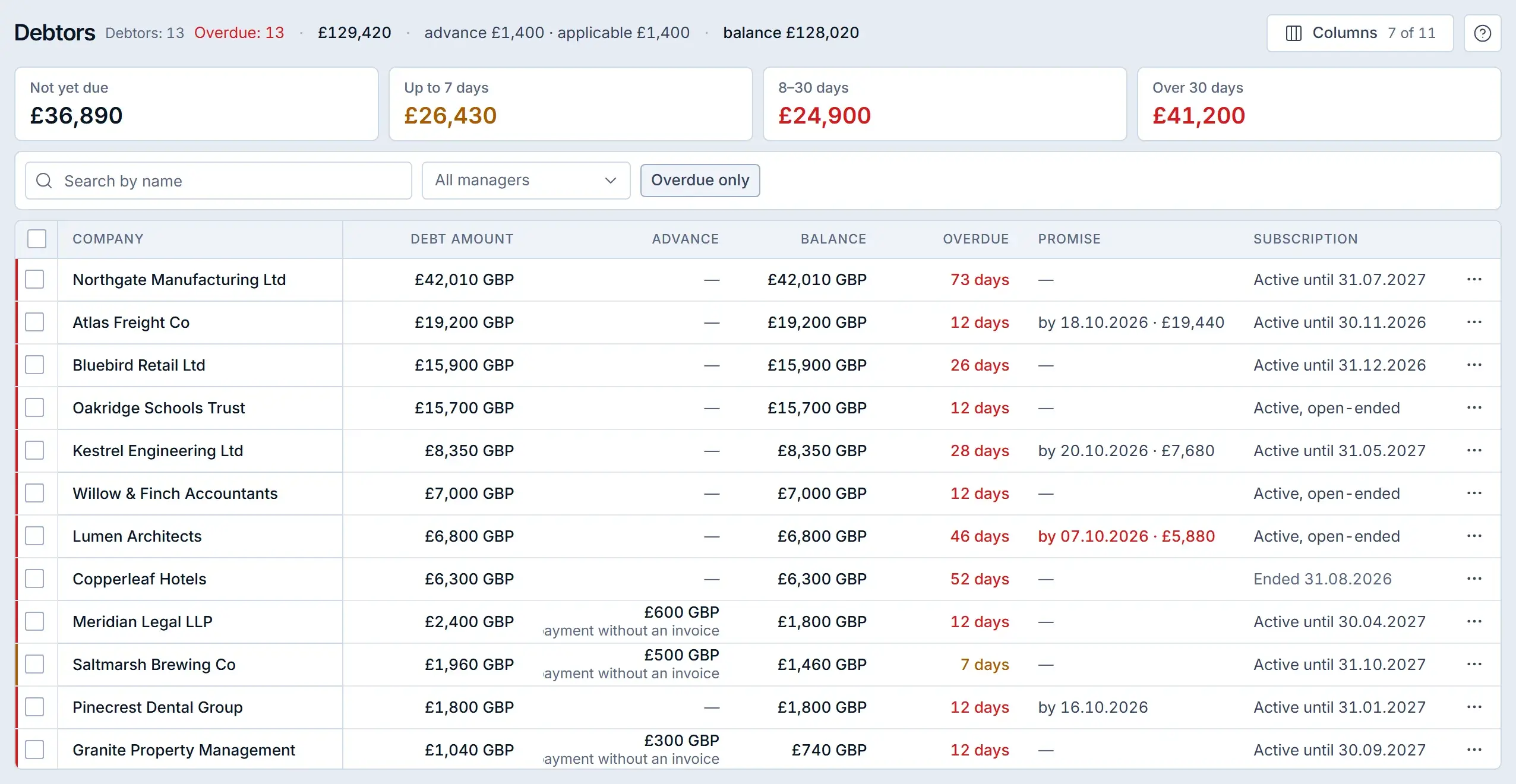
Debtors in a Krokul demo workspace: debt by age at the top, one row per client below. Record every promised payment date
When a client says they will pay on Friday, save that date and the amount on the client record. Next week the conversation starts from the date the client gave you, and broken promises are the first calls to make.
In Krokul, a payment promise creates a task for the client’s account owner on the promised date. The Debtors list shows the promise in its own column.
Tip. Leave the amount empty when the client promises to pay the whole debt. Record an amount only for a partial payment.
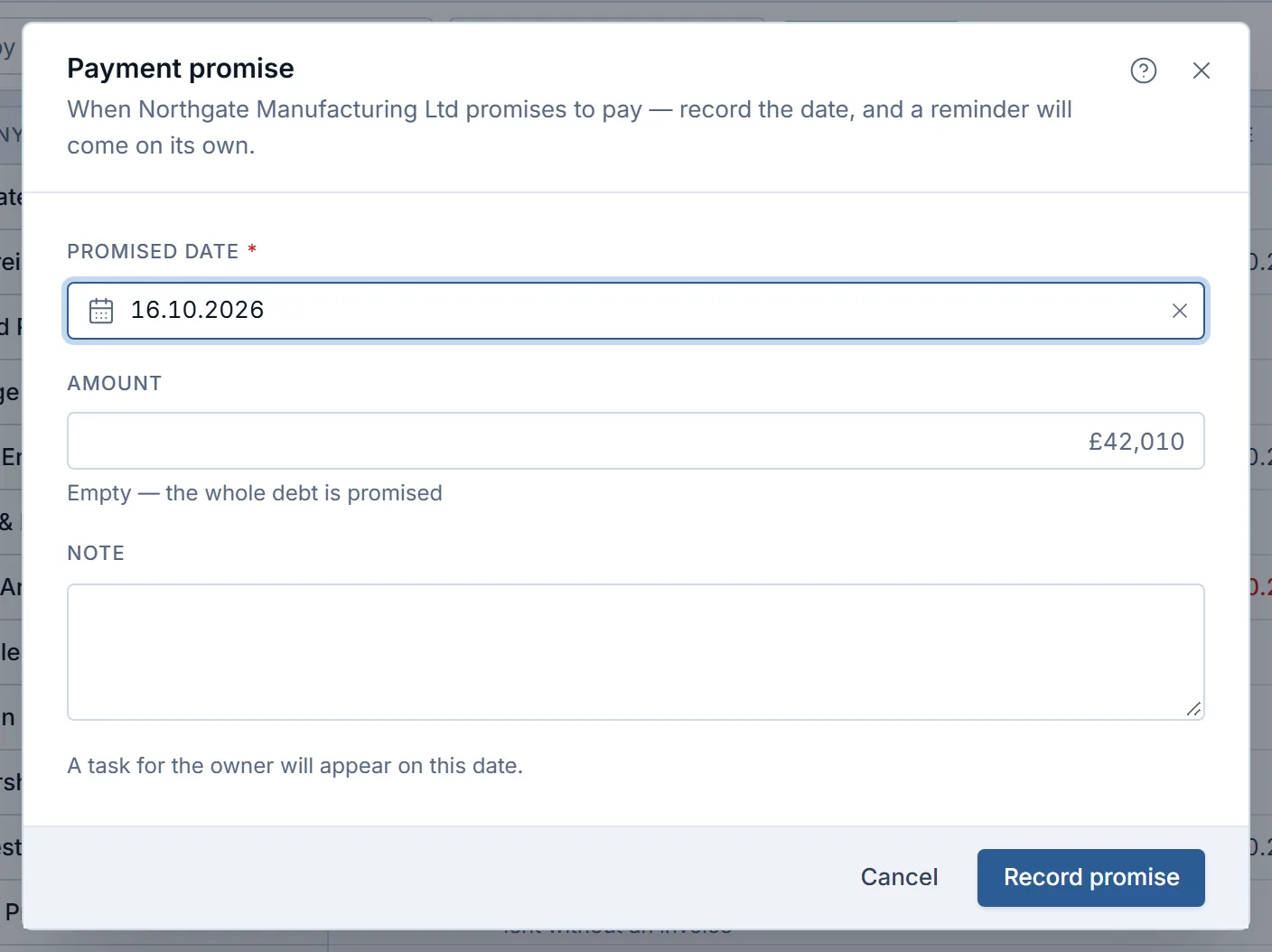
Recording a promise in a Krokul demo workspace: a date, an optional amount and a note. Escalate at 30 days overdue
After 30 days the invoice is no longer stuck in approval. Move the conversation from the accountant to the person who signed the contract, agree a payment plan for the full amount and pause new work until the oldest invoice is settled.
How to choose payment terms that clients accept#
Payment terms work best when they match the size and risk of the order. A short term suits a small order or a new client, and a longer term fits a large buyer whose payment runs happen on fixed dates. Whatever you choose, state it in days from the invoice date, because “end of month” leaves room for two readings.
| Situation | Suggested term | Safeguard |
|---|---|---|
| New client, first order | Prepayment or 7 days | Advance invoice issued before work starts |
| Regular client, monthly work | 15 to 30 days | Reminder three days before the due date |
| Large buyer with fixed payment runs | 45 to 60 days | Invoice sent early enough to enter the next run |
| Project with milestones | Per milestone, 7 to 14 days | One planned payment per milestone |
How to group overdue invoices by age#
Aging groups sort open invoices by how many days they are past due. Four groups cover most B2B companies, and each group has its own action. The detailed method, with the actions per group, is in the guide on setting aging buckets.
Count each invoice in its own group. A client with one fresh invoice and one old invoice belongs to two groups, and the old invoice is the one to call about. Krokul counts debt this way, so a client with three invoices does not land entirely in the oldest group.
| Days overdue | Typical cause | Action |
|---|---|---|
| Not yet due | Invoice is still within its term | Reminder three days before the due date |
| Up to 7 | Lost invoice, approval delay | Resend the invoice and confirm a date |
| 8–30 | Cash-flow pressure on the client side | Call and record a promised payment date |
| Over 30 | Dispute or low priority | Escalate to the contract signer, agree a payment plan |
| Invoice | Amount | Days overdue | Group |
|---|---|---|---|
| INV-101 | £5,000 | 3 | Up to 7 |
| INV-088 | £3,000 | 20 | 8–30 |
| INV-052 | £8,000 | 45 | Over 30 |
The same client contributes £5,000, £3,000 and £8,000 to three different totals. Calling about the £8,000 invoice first recovers half of the £16,000 owed by this client in one conversation.
How to measure collection speed with DSO#
Days sales outstanding (DSO) shows whether the routine works. As invoices go out sooner and reminders go out on time, the number of days between invoice and payment goes down. The guide on what DSO is and how to calculate it covers the formula and its limits.
- Days sales outstanding (DSO)
- Days sales outstanding is the average number of days it takes to collect payment after an invoice. DSO = accounts receivable at the end of the period ÷ revenue invoiced in the period × days in the period.
| Quarter | Receivable at quarter end | Invoiced in quarter | DSO |
|---|---|---|---|
| Q1 | £150,000 | £360,000 | 37.5 days |
| Q2 | £120,000 | £360,000 | 30 days |
| Q3 | £99,000 | £330,000 | 27 days |
In the first row, 150,000 ÷ 360,000 × 90 gives 37.5 days. Compare the number quarter to quarter, because the trend says more than any single value. Krokul calculates DSO for the last 90 days by default and shows it as a tile on the dashboard, with the debt, the revenue and the days behind the number.
How to chase late invoice payments every week#
A weekly collection routine gives each overdue invoice an owner, a next action and a date. The full routine is in the guide on chasing late invoice payments, and the table shows its rhythm.
| Day | Action | Result |
|---|---|---|
| Monday | Open the overdue list, oldest debt first | A call list with an owner per client |
| Tuesday | Call clients in the 8–30 group | A promised date for each |
| Wednesday | Resend invoices to clients in the up-to-7 group | Confirmation that the right person has the invoice |
| Thursday | Escalate the over-30 group to contract signers | A payment plan or a named dispute |
| Friday | Check promises due this week | Broken promises listed for Monday |
A fixed hour every week keeps the routine alive. Krokul supports the rhythm with the list of debtors for Monday, a task for the account owner from the row menu and a filter for broken promises for Friday.
How to record a promise to pay and follow up when it slips#
A promise to pay is a date, and often an amount, that the client names for a payment. Written on the client record, it turns a vague “soon” into something you can check. The guide on recording a promise to pay explains what to store and what to say when the date passes.
- Record the date the client named, never a date you assume.
- Record an amount only for a partial payment; an empty amount means the whole debt.
- Note who made the promise and by which channel.
- Call on the promised date if the money is missing, and record the new date next to the broken one.
Krokul stores a promise as an event in the client’s feed and sets a task for the account owner on that day. It rejects a date in the past. The Debtors list can filter for broken promises, promises due today and overdue clients with no promise at all, which is the shortest route to the calls that matter.
How to forecast cash receipts from open invoices#
A cash receipts forecast estimates when the money from open invoices will arrive, using each client’s real payment behaviour and ignoring the due date printed on the invoice. The guide on forecasting cash receipts walks through the method.
The method shifts every open invoice by the client’s usual delay. That delay is the median number of days between due date and payment over the client’s recent history. When a client has no history, the company-wide median fills the gap.
| Client | Amount | Due date | Usual delay | Expected date |
|---|---|---|---|---|
| Client A | £10,000 | 10 Nov | 12 days | 22 Nov |
| Client B | £6,000 | 15 Nov | 0 days | 15 Nov |
| Client C | £4,000 | 20 Nov | 25 days | 15 Dec |
By the end of November, £16,000 is expected and £4,000 slips into December. Planning payroll against the due dates would have shown £20,000 and a hole of £4,000.
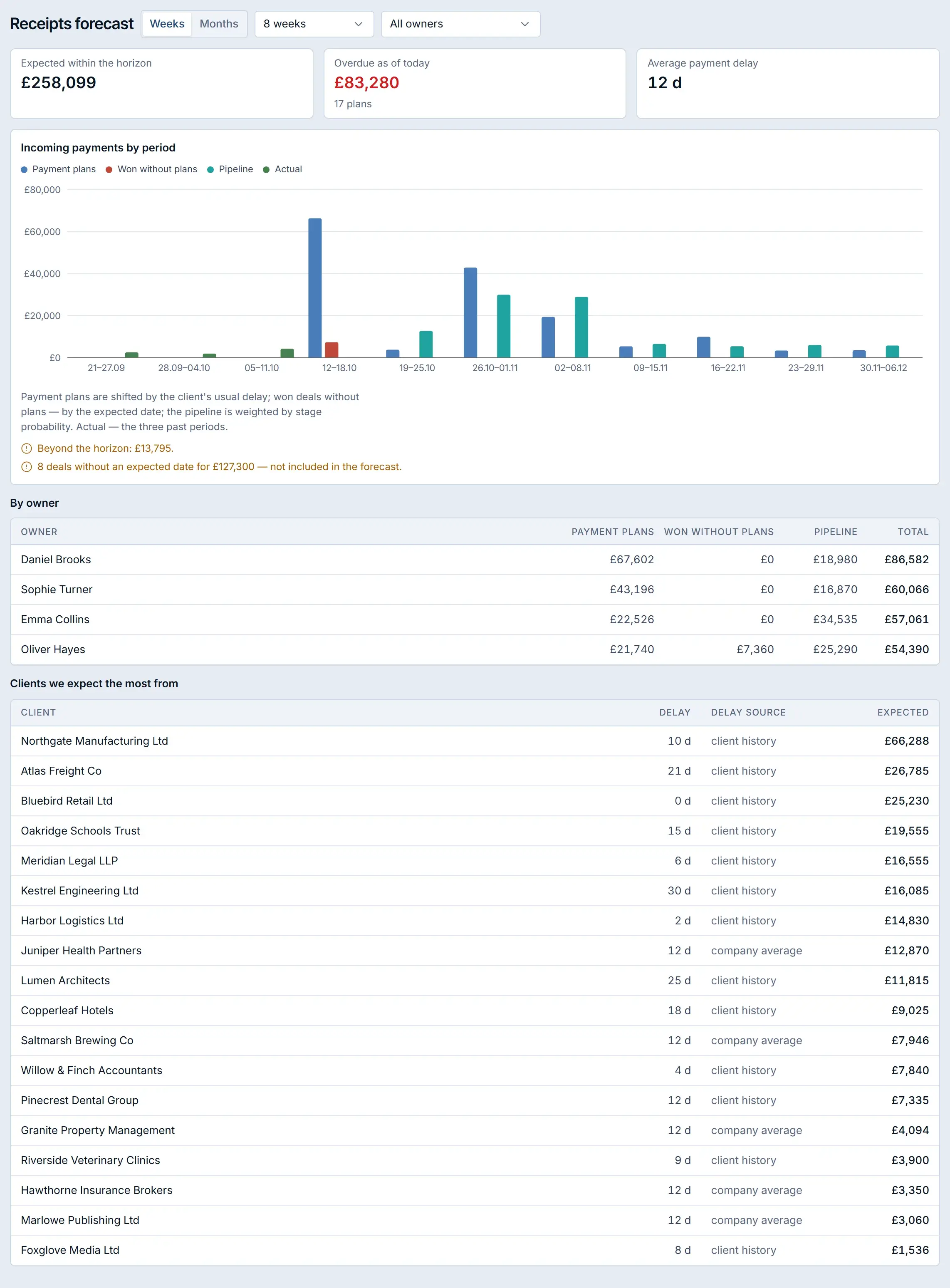
Krokul’s Receipts forecast screen applies this method. It shifts payment plans by the client’s usual delay, adds won deals that have no plan and open deals weighted by stage probability, and shows the three past periods as actual receipts. Weeks or months, an owner filter and an Excel export are on the same screen.
How to match bank payments to invoices automatically#
Matching a bank payment to an invoice means finding the invoice a transfer pays, from the details in the transfer. The guide on matching bank payments to invoices covers the full method; the order of checks is the part that decides accuracy.
| Check | What it looks for | Confidence |
|---|---|---|
| Payment code | The code printed on the invoice, found in the payment purpose | Exact |
| Invoice number and amount | The invoice number in the purpose with the matching amount | High |
| Client identity | The sender’s tax ID or IBAN, then that client’s open payment plans | Medium |
| Amount and date | An open invoice with the same amount near its due date | Hint only |
Krokul’s Incoming payments screen runs these checks in this order and stops at the first match. A bank line becomes a payment after a confirmation, given in one click or automatically when auto-confirm by payment code is switched on. Rows matched by payment code can be confirmed in one click, and a transfer that is not a client payment goes to “Not ours”.
The invoice print in Krokul can carry the payment code, the payment purpose and a QR code, which feeds the first and strongest check. Lines arrive from a bank connected in the Marketplace.
How to apply one payment to several invoices, advances and refunds#
One client payment often covers several invoices, a prepayment or a partial amount. The guide on applying a payment to multiple invoices shows the rules; the example shows the arithmetic.
| Line | Amount |
|---|---|
| Payment received | £6,000 |
| Applied to INV-101 | £2,519 |
| Applied to INV-102 | £3,133 |
| Unapplied remainder | £348 |
The unapplied remainder is visible, so nothing is lost: it waits as an advance until the next invoice. In Krokul the allocation covers up to 50 invoices of the same deal, and the total cannot exceed the payment. Every allocation lands in the history of the invoice it closes.
A refund is recorded as its own numbered line linked to the original payment, in full or in part, up to the amount not yet returned. An advance invoice is issued from a planned payment in one action, and a client’s advance shows in its own column in Debtors.
How to add a payment link and QR code to a B2B invoice#
A payment link lets the client pay an invoice online in one step, and a QR code does the same from a banking app. Both remove the retyping of bank details, which is where small errors and delays start. The guide on adding a payment link to an invoice lists the options.
Krokul issues a payment link from a deal through a connected payment provider, monoPay or NovaPay. The payment then arrives in the Payments register without a parallel record. The invoice print has its own “How to pay” block with the recipient, the payment purpose with the plan code and a QR code.
How to send overdue payment reminders automatically#
Automatic reminders send or schedule a follow-up at fixed points around the due date, so nobody has to remember. The guide on automating overdue payment reminders describes the cadence and the wording.
| When | Channel | Message |
|---|---|---|
| 3 days before | Friendly check that the invoice reached the approver | |
| 1 day after | Invoice attached again, due date restated | |
| 7 days after | Phone | Ask for a payment date and record it |
| 30 days after | Call from the contract signer | Payment plan for the full amount |
Krokul has an automation trigger for overdue planned payments with a threshold between 0 and 365 days. The rule fires once per overdue payment, skips payments that are already paid and ignores lost deals. Check the actions you attach to the rule before relying on it, and compare the cadence above with your contract.
How to see who owes you money every morning#
A morning debtor list shows each client’s debt, its age and the next action on one screen. The guide on the debtor list in Krokul shows the daily routine step by step, and the payments and debtors page explains how the screen fits the rest of the deal.
- The header counts debtors and overdue clients, with the total debt, the advance and the balance.
- Four tiles split the debt into not yet due, up to 7 days, 8–30 days and over 30 days, and clicking a tile filters the list.
- The table shows the debt, the advance, the balance, the days overdue and the promise for every client.
- The row menu records a promise, creates a task for the account owner, opens the invoices or applies an advance to open invoices.
Which collection mistakes cost the most#
- Sending invoices in batches at month end. Every day of delay moves the payment day by the same amount; issue each invoice when the work is accepted.
- Leaving payment terms out of the contract. The client then pays on their own schedule; write the number of days and the late-payment rule before the first invoice.
- Chasing the largest client first by habit. The oldest invoice usually deserves the first call, whatever the client size.
- Keeping promises in email threads. A promise that is not on the client record is not followed up; record the date the same day.
- Leaving received payments unapplied. A paid invoice then looks overdue, and the next call goes to a client who already paid.
Where to start: a decision table#
Pick the row that matches the symptom you see today and start with that guide. Each row is a one-week change.
| Symptom | First fix | Guide |
|---|---|---|
| Invoices are paid at a different time every month | Write the term into the contract and the client record | Aging buckets |
| Nobody knows how fast clients pay | Calculate DSO each quarter | What DSO is |
| Clients say “next week” and nothing follows | Record every promised date | Promise to pay |
| Cash planning keeps missing | Shift due dates by client delay | Cash receipts forecast |
| Bank lines are typed in by hand | Match by payment code | Bank matching |
| Paid invoices still show as overdue | Apply each payment to its invoices | Split payments |
Frequently asked questions#
What should payment terms in a B2B contract state?
Payment terms state the number of days from the invoice date, the currency, the bank details and the rule for late payment. Shorter terms suit small orders and new clients, and longer terms are usually negotiated with large buyers.
Can I charge a late payment fee?
A late fee is enforceable only when the contract states it and the law of your country allows it. Write the rate into the contract before the first invoice and ask your accountant to confirm the wording.
Should I stop work for a client who pays late?
Pause new work once the oldest invoice is more than 30 days overdue, and say so in writing together with the amount and the date you need. Finishing work already in progress keeps the relationship and your own costs under control.
What should I do when a client disputes an invoice?
Ask the client to pay the lines they do not dispute by the due date and record the reason for the dispute on the client record. Settle the disputed lines separately, so the undisputed amount stops counting as overdue.
How often should I review overdue invoices?
Review them once a week, at the same hour, from the oldest debt down. A daily glance at the list of new overdue invoices is enough between the weekly reviews.
Who should own collections in a small company?
The account owner of each client owns the call, and one finance person owns the weekly list. Splitting the roles this way gives every overdue invoice a named person without turning collection into a full-time job.