Short answer
To track overdue invoices every morning in Krokul, open the Debtors screen. It lists each client with unpaid invoices, splits the debt into four age groups and shows the promised payment date. Sort by days overdue, record every promise on the client and give the account owner a follow-up task.
- Screen: Debtors
- Role: finance manager or account owner
On this page
When a morning debtor list is worth setting up#
- You find out about an unpaid invoice from the client, a month after the due date.
- Overdue invoices live in a spreadsheet that one person updates on Fridays.
- A client promised to pay and nobody remembers the date.
The routine below is the daily part of the collection routine for B2B invoices. It runs on the invoices and payments already in the system.
How to see overdue clients every morning in five steps#
Open Debtors and keep the Overdue only filter on
The Debtors screen opens with the Overdue only filter switched on, so the first thing you see is clients whose due date has passed. Debt is the sum of issued invoices minus the payments applied to them. Switch the filter off to see debts that are not yet due.
Read the four age totals
In the standard palette, four tiles above the table split the debt into not yet due, up to 7 days, 8–30 days and over 30 days. Each invoice counts in its own group, so one client can sit in two tiles. Click a group to filter the table to it. In the branded Krokul palette the same groups are buttons in the filter bar, and the presets sit under Filters.
The method behind the groups is in the guide on setting aging buckets.
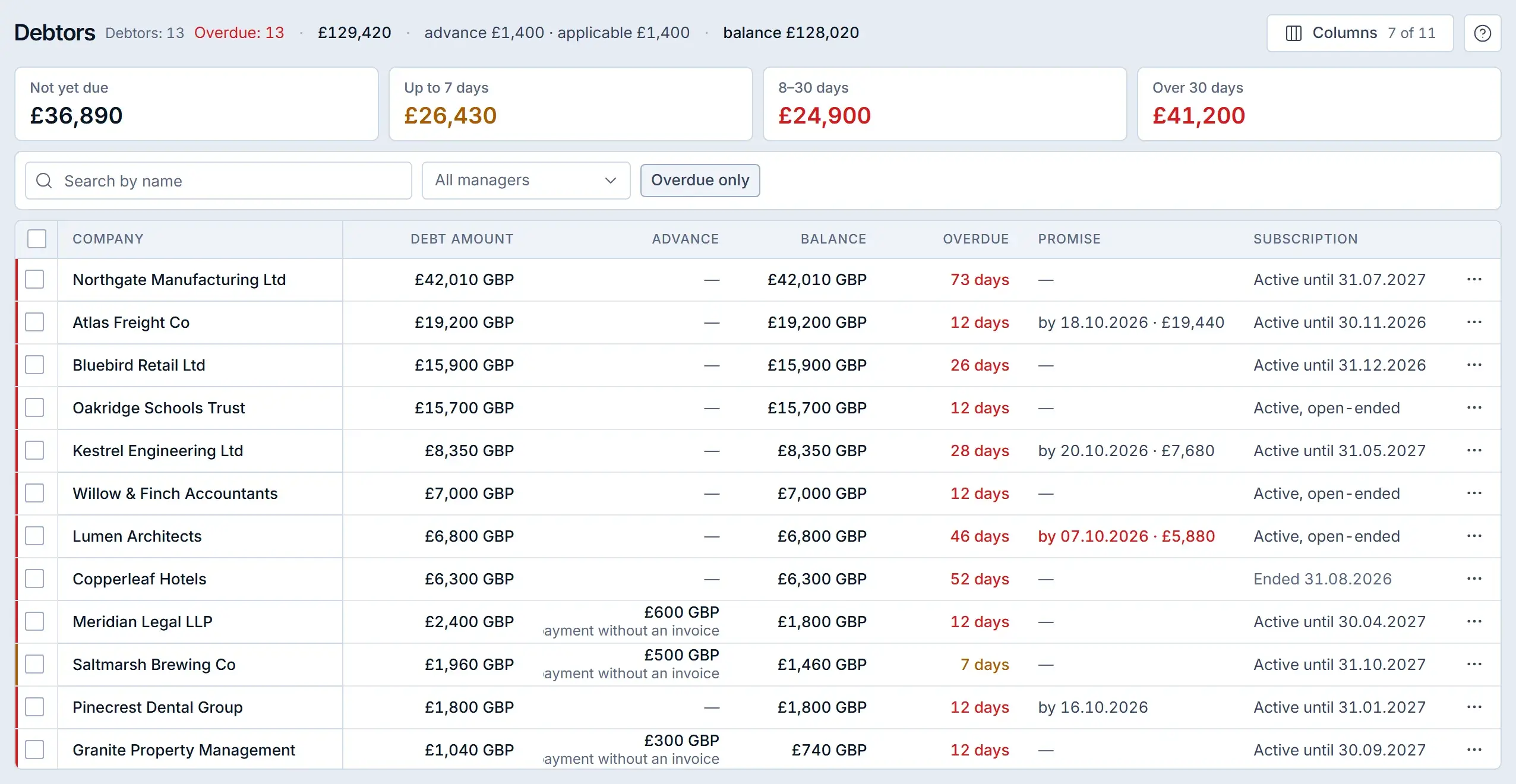
Debtors in a Krokul demo workspace: age totals on top, one row per client below. Sort by days overdue and call the longest overdue first
The table opens sorted by debt amount, largest first. Click the Overdue column header to sort by days overdue, largest first. Call those clients first.
Record the date the client promises
Open the row menu and choose the payment promise. Pick the date, add an amount if the client will pay only part of the debt, and save. The date appears in the Promise column, and the client record gets an entry in its activity feed.
The promised date also becomes a task for the client’s account owner on that day, so the follow-up call is in somebody’s list without a reminder from you.
Tip. Leave the amount empty when the client promises the whole debt. A date in the past is rejected.
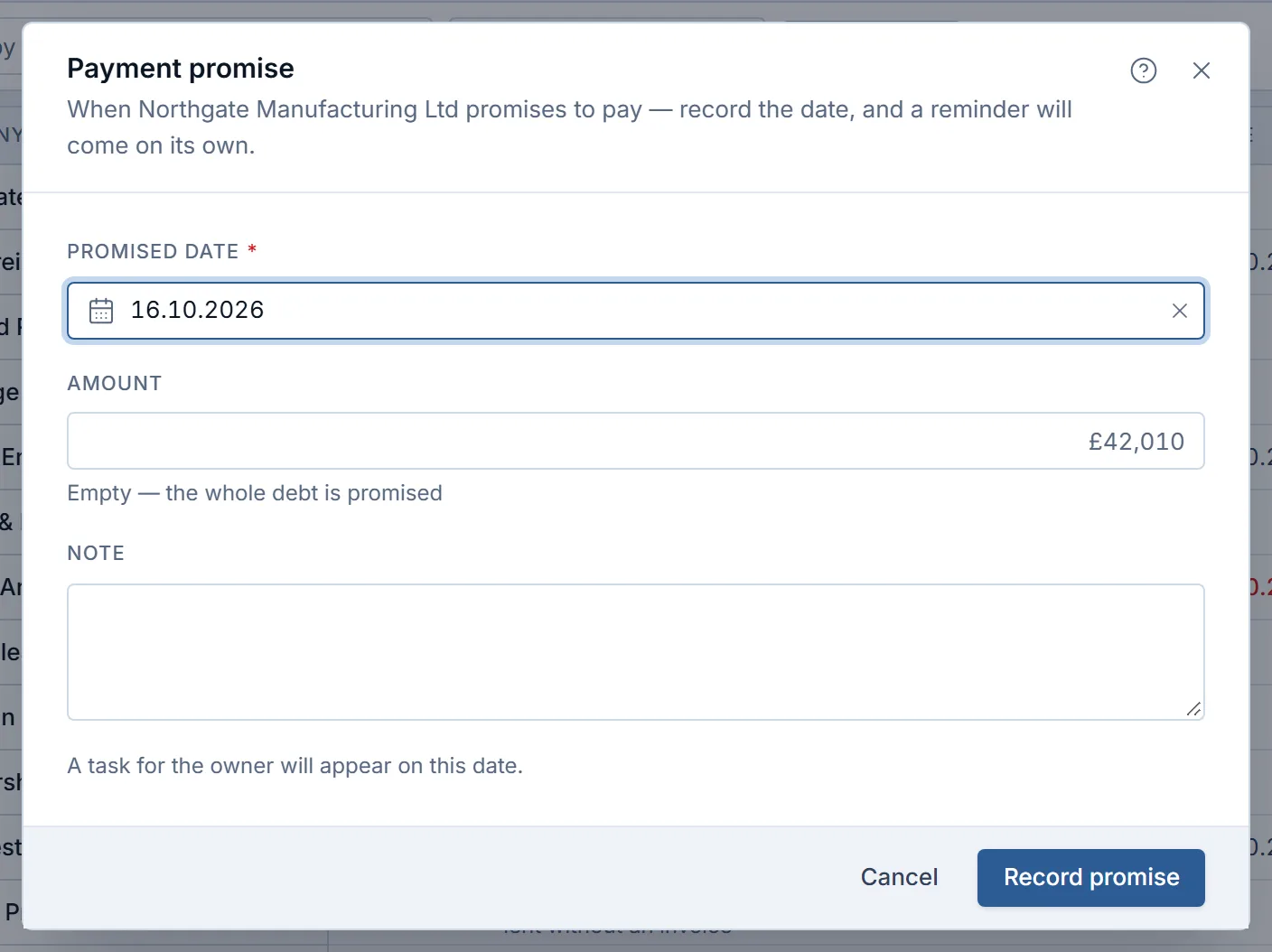
Recording a promise in a Krokul demo workspace: a date, an optional amount and a note. Give the account owner a task for the rest
For clients without a promise, tick their rows and press the task button above the table, or use the row menu for one client. Krokul creates a reminder task for each client’s account owner. The bulk action skips a client who already has an open task with the same title and tells you how many were skipped, while the row menu simply creates the task.
What one morning looks like#
The table shows one morning with four clients on the overdue list. The order follows days overdue, and the action follows the group.
| Client | Debt | Days overdue | Promise | Action |
|---|---|---|---|---|
| Client A | £42,000 | 73 | none | Call the contract signer, agree a payment plan |
| Client B | £6,800 | 46 | broken | Call today and record a new date |
| Client C | £19,200 | 12 | in 3 days | Wait, the task will fire on the date |
| Client D | £1,800 | 7 | none | Resend the invoice, ask for a date |
To find broken promises, use the Promise broken preset, next to the screen title or under Filters in the branded palette.
Which mistakes spoil the morning list#
- Calling the largest client first by habit. Sort by days overdue so the oldest debt gets the first call.
- Leaving received payments unapplied. A paid invoice then shows as debt, so apply each payment to its invoices before the review.
- Keeping promises in chat messages. A date that is not on the client record produces no task, so record it the same day.
Morning checklist for the debtor list#
- Open Debtors and compare the age totals with yesterday.
- Sort by days overdue and call the top three rows.
- Record a promised date after every call.
- Tick the clients without a promise and create tasks for their account owners.
- Once a week, switch off Overdue only and check the Not yet due total for what is coming.
How to check that collection is getting faster#
Days sales outstanding (DSO) shows whether the morning routine works. DSO is accounts receivable at the end of the period divided by revenue invoiced in the period, multiplied by the days in the period. Krokul shows the figure for the last 90 days as a tile on the Sales dashboard for admins and managers. The guide on what DSO is covers the formula.
To see how Krokul links payments to deals and builds this list, read about payments and debtors in Krokul. The guide on recording a promise to pay covers what to do when the date slips.
Frequently asked questions#
Does the debtor list include invoices that are not due yet?
It includes them when you switch off Overdue only. The Not yet due group counts every invoice that has not reached its due date, with no limit in days, and a preset narrows the list to invoices due in 3 days.
What happens when a client pays after I recorded a promise?
Apply the payment to the invoice and the debt drops. The promise stays in the client’s activity feed as history.
Can I create reminder tasks for many clients at once?
Yes. Tick the rows and press the task button above the table. Clients who already have an open task with the same title are skipped.